ActiveCampaign Automation Video Testimonials: Proof-Driven Nurture That Converts
ActiveCampaign automation video testimonials: where to place clips, segment by industry, and use 3 copy-ready workflows to boost bookings, replies, and trust.
What would happen if your emails didn’t just tell people you’re legit… but showed them, so that prospects stop hesitating and start booking? Many teams see website visitors who watch testimonials are more likely to convert, and the reason is simple: your future clients trust people who look and sound like them more than they trust your copy.
If you’re in healthcare, finance, or real estate, you’re fighting a crowded market and high-stakes skepticism, plus you don’t have time to hand-hold every lead. The good news: ActiveCampaign automation + video testimonials lets you deliver the right proof at the exact moment your buyer’s brain is whispering, “Is this safe? Is this worth it?” Let’s turn those customer stories into a quiet, always-on conversion engine, complete with placements, workflows, and a few real-world “oh wow, that worked” moments.
Key Takeaways
- ActiveCampaign automation video testimonials convert best when you nail timing and match the clip to the prospect’s stage and hesitation, instead of dumping proof into every email.
- Use segmentation (industry, use-case, and goal) to route the right story to the right lead so your healthcare, finance, and real estate audiences see “people like me” proof.
- Deploy video testimonials at high-leverage placements—after value emails, right before the first CTA, and as objection-triggered sends based on behaviors like pricing clicks or demo views.
- Build three core automations in ActiveCampaign: a lead-warming proof sequence, an objection-triggered proof injection, and a reactivation campaign that uses reassurance-first clips to restart conversations.
- Make clips automation-ready with 15–30 second videos, a strong first-3-seconds hook, captions/transcripts for silent viewing and SEO, and clear tagging by hierarchy (authority/similarity/specificity).
- Measure ActiveCampaign automation video testimonials by downstream outcomes—reply rate, bookings, and close rate—using proof-view tags and clip IDs rather than relying on opens and clicks alone.
What This Page Covers (and What It Doesn’t)
You’re here for one thing: ActiveCampaign automation video testimonials, not a fluffy pep talk, and not a 40-minute “let’s define marketing” lecture.
Here’s what we are covering:
- Where video testimonials belong inside ActiveCampaign automations (so they influence decisions, not just decorate emails)
- How to segment proof by industry and use-case (so your realtor lead doesn’t get a testimonial from a dental practice)
- Three copy-ready automation workflows you can build today
- What makes a testimonial clip “automation-ready” (length, hook, captions, mapping)
- How to measure impact beyond opens and clicks
And here’s what we’re not covering:
- A review of ActiveCampaign as a platform (it’s powerful: you already know that)
- General email design tips like fonts, button colors, or “best time to send” rabbit holes
- Non-ActiveCampaign tools and workflows (Zapier chains, HubSpot sequences, etc.)
One more important point, because this is where most teams go sideways.
Most businesses misuse testimonials in two predictable ways:
- They dump a bunch of quotes at the bottom of every email (proof becomes wallpaper).
- They use the wrong testimonial too early (a “we got amazing ROI.” clip to someone who hasn’t even decided they have a problem yet).
If you fix nothing else, fix timing and match. That’s the whole game.
Why Social Proof Works in Automated Funnels

Automation changes the rules of persuasion.
When you’re selling asynchronously, someone reading your email between patient appointments, closings, or client calls, your job is to remove friction without being there live. Social proof does that because it answers the silent questions:
- “Has this worked for someone like me?”
- “Will I regret this?”
- “Is this risky… or safe?”
Static proof (a testimonials page) is like a billboard on a road your prospect may never drive.
Dynamic proof (video testimonials triggered by behavior) is like a friend tapping them on the shoulder at the exact moment they’re hesitating.
That’s why ActiveCampaign automation video testimonials perform so well: the timing is earned.
You can also make this SEO-friendly. When you embed video clips thoughtfully on landing pages and support them with transcripts, you improve engagement signals (time on page, scroll depth). Google’s own guidance on performance and discoverability lives at Google Search Central, and, yes, those basics matter when your funnel starts with search.
Now let’s talk about which proof to use, because not all testimonials are created equal.
Definition box: proof hierarchy (authority → similarity → specificity)
Proof hierarchy is the simple idea that different testimonials persuade in different ways, and you should deploy them by stage.
- Authority → “Trusted names trust you.”
- Examples: recognizable brands, respected professionals, credentialed experts.
- Best for: cold leads who need a quick credibility shortcut.
- Similarity → “People like me got results.”
- Examples: same industry (dentist, mortgage broker, realtor), same role (practice owner), same situation.
- Best for: nurture sequences where the lead is trying to picture themselves succeeding.
- Specificity → “Here’s exactly what changed.”
- Examples: clear before/after outcomes, timeline, numbers, and the ‘how’.
- Best for: late-stage objections (price, time, risk) and sales handoffs.
Quick gut-check: if your testimonial doesn’t say what changed, it’s probably vibes-only. Vibes don’t close high-trust deals.
Best ActiveCampaign Placements (Automation-First)
If you’ve been sprinkling testimonials randomly, one in a newsletter here, a link to a case study there, you’re not alone.
But the highest ROI comes when testimonials are treated like conversion assets with rules: when they appear, who sees them, and what belief they’re meant to unlock.
Lead Warming Sequences
This is where you earn attention before you ask for commitment.
A personal example: I once watched a financial advisor send a “Book a call” email on Day 2… to leads who hadn’t even replied to the first welcome email. The campaign didn’t fail because the offer was bad. It failed because it was too much, too soon.
In lead warming, your best placements are:
- After a helpful “here’s what to do next” email (proof reinforces competence)
- Right before the first real CTA (proof reduces anxiety)
- As a PS with a single-line setup: “If you want to see what this looks like in real life…”
If you want a clean system for collecting these clips without turning your week into a scheduling circus, Share One’s guide on how to collect customer stories at scale is the playbook we wish every founder read in January.
Objection-Triggered Proof Emails
This is the secret sauce.
Your lead doesn’t need more information, they need the right reassurance.
In ActiveCampaign, you can infer objections from behavior:
- Clicking pricing multiple times → price / ROI concern
- Watching a demo but not booking → time / complexity concern
- Visiting testimonials page then leaving → trust / credibility concern
Then you trigger a proof email that answers that exact fear.
I like framing it like a doctor’s note: short, specific, and calm. No hype. (Your prospect’s nervous system can smell hype from 3,000 miles away.)
Segmentation-Based Proof (Industry / Use-Case)
Segmentation is where “nice testimonial” turns into “wait… that’s me.”
Use tags and custom fields to route proof like this:
- Industry tags: healthcare, finance, real estate
- Service type: cosmetic dentistry vs. family practice: mortgage broker vs. CFP: buyer’s agent vs. listing agent
- Primary goal: more leads, better-qualified calls, higher close rate
Then match the clip:
- Healthcare leads get a story that emphasizes trust, bedside manner, outcomes (and if you’re regulated, keep it compliant)
- Finance leads get calm, risk-aware proof: process, clarity, results
- Real estate leads get speed + certainty: “We sold in 14 days,” “We stopped the lowball chaos,” etc.
This is also where your content can rank. Search engines love specificity and relevance, and smart marketers obsess over it, Search Engine Journal has years of coverage on how engagement and relevance signals tie back to performance.
Reactivation + Winback
Reactivation isn’t about guilt-tripping people for ghosting you.
It’s about re-opening the loop with something that feels human.
What works best:
- A short clip that starts with the same hesitation your lead likely has (“I almost didn’t do this because…”)
- A simple question CTA: “Want me to send the exact checklist we used?”
- A “we kept your spot warm” tone, friendly, not needy
And if you plan to add paid retargeting later, keep your best proof clips ready to deploy across channels. Share One has a solid primer on using video testimonials in ads and retargeting so your email proof and your paid proof don’t feel like two different brands.
3 Automation Workflows (Step-by-Step)
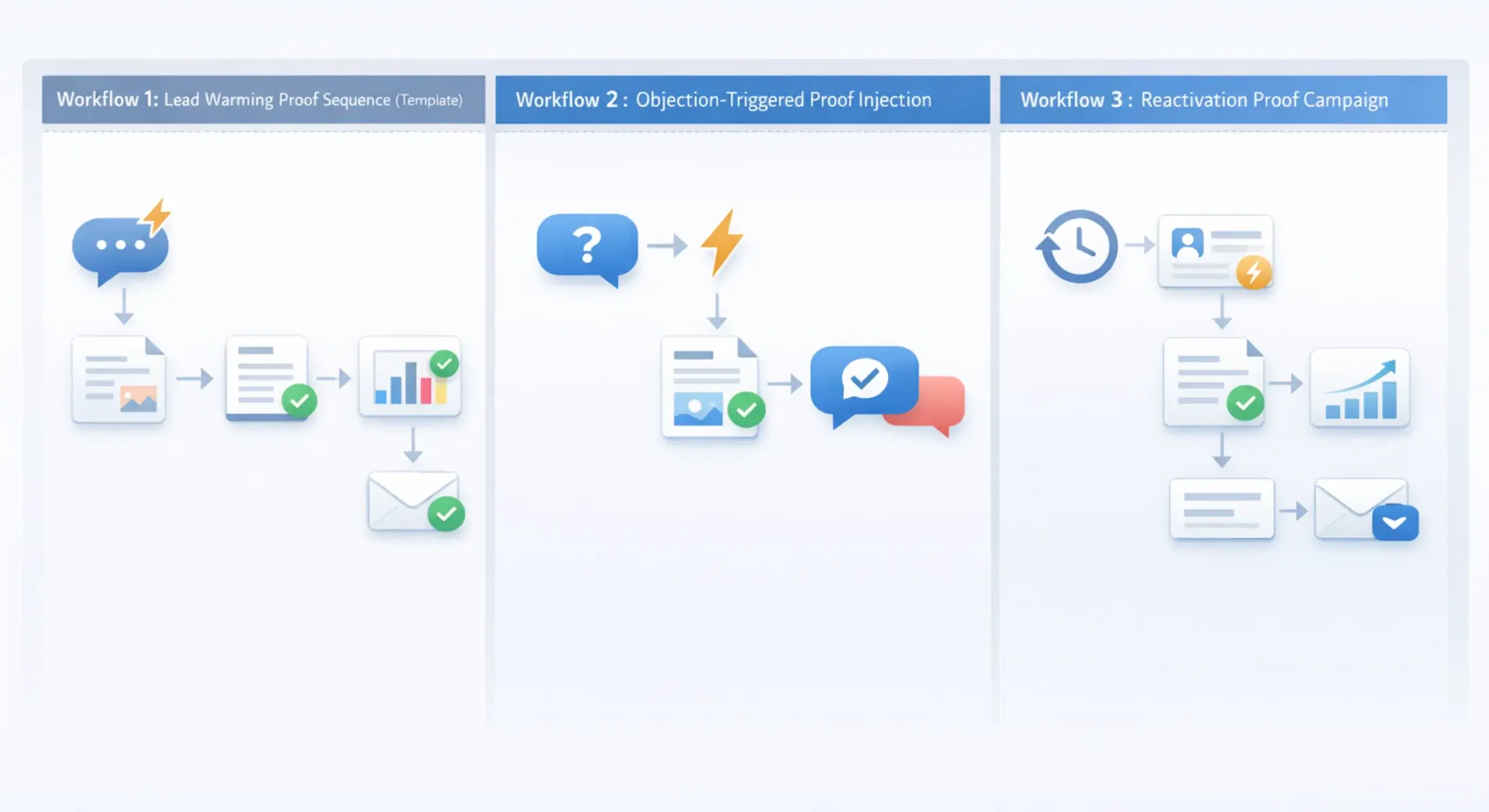
These are built to be practical. You can create them in ActiveCampaign without a developer, a 12-tab spreadsheet, or a small emotional breakdown.
Workflow 1: Lead Warming Proof Sequence (Template)
Goal: Build trust before the first “book a call” push.
Entry trigger: Subscribes to list / downloads lead magnet / requests info.
Sequence logic:
- Email 1 (immediate): Welcome + one clear next step.
- Wait: 1 day.
- Email 2: Value email (“3 things to avoid…”) + 15–30 second testimonial clip embedded or linked.
- Wait: 2 days.
- Email 3: “Here’s our process” + FAQ.
- If/Else:
- If they clicked the video or FAQ → tag as Engaged and send stronger proof (specific outcomes).
- If they didn’t engage → send a softer, similarity-based clip (same industry/role) with a low-pressure CTA.
Exit condition: Booking link clicked, reply received, or sales form submitted.
Pro tip: Don’t use your biggest “we doubled revenue.” proof here. Early-stage leads need clarity more than fireworks.
Workflow 2: Objection-Triggered Proof Injection (Template)
Goal: Respond automatically when behavior signals doubt.
Entry trigger options:
- Visited pricing page 2+ times in 7 days
- Clicked “cost” link in an email
- Opened 4+ emails but didn’t book
Objection mapping (simple):
Objection signalWhat they’re feelingBest testimonial type
Pricing clicks“Is it worth it?”Specificity (ROI, time saved)
Demo watched, no action“This looks like work.”Similarity (busy owner, simple rollout)
Multiple page visits“Is this legit?”Authority (credible professional/brand)
Sequence logic:
- Send objection email with subject like: “Quick question about timing/cost”
- Include 1 clip that mirrors the objection in the first sentence.
- Wait: 3 days.
- If booked: stop.
- If not booked: send a plain-text follow-up offering two choices (“Want the 2-minute version or the full plan?”).
Sales handoff consideration: Tag the objection so your team knows what reassurance to repeat on the call.
Workflow 3: Reactivation Proof Campaign (Template)
Goal: Wake up cold leads without sounding desperate.
Entry trigger: No opens OR no site visits for 30 days (or 45, depends on your cycle).
Sequence logic:
- Email 1: “Still working on this?” + a short clip framed as reassurance.
- Wait: 4 days.
- Email 2: A different angle clip (rotate proof) + one resource.
- If engaged: tag as Reactivated: push to a short nurture.
- If not engaged after 2 attempts: suppress for 60–90 days to protect deliverability.
Asset rotation matters here. Re-sending the same clip is like re-heating fries (you can do it… but you’ll regret it).
If you want a more scalable system for building and deploying proof across your whole customer journey, this video testimonial workflow is a strong reference point, especially if you’re trying to standardize across multiple offerings or locations.
Testimonial Asset Specs for Automated Funnels
A testimonial that’s “good” on a website can be awkward inside an automation.
Automations need clips that are fast, skimmable, and easy to match, like clean Lego bricks, not one giant sculpture.
Clip Length + Hook
Aim for 15–30 seconds for email (you can host longer versions elsewhere).
Rules that work:
- Start with the outcome or the tension in the first 2–3 seconds
- Keep it to one outcome per clip
- Let small imperfections live (over-polished often reads as staged)
A strong hook sounds like:
- “I was losing leads every week because I’d forget to follow up…”
- “I thought this would be expensive, but it saved me 6 hours a week.”
Captions and Transcripts
Captions aren’t optional.
Your leads are watching on phones in parking lots, waiting rooms, and in line for coffee. Sound is often off.
Do this:
- Burn in captions for social/ads
- Include a short transcript snippet beneath the video in email (1–3 lines)
- Store full transcripts for reuse on landing pages (SEO + accessibility)
If you’re trying to squeeze every drop of value from each clip, you’ll like Share One’s guide on how to repurpose testimonial videos for ROI, especially when you want email, site, sales, and ads to all sing from the same hymn book.
Proof Hierarchy Mapping
This is where most libraries fall apart. People name files “Testimonial_FINAL_v7” and then wonder why nobody uses them.
Instead, tag and map every asset by:
- Hierarchy: Authority / Similarity / Specificity
- Industry: healthcare / finance / real estate
- Funnel stage: nurture / objection / reactivation
- Primary objection answered: price, time, trust, complexity
Then build a simple “proof registry” doc (even a spreadsheet is fine) so your automations can stay clean.
If your sales team is involved, don’t keep this limited to marketing. Here’s how to think about deploying clips for calls and follow-ups using video testimonials for sales teams.
Measurement: Replies, Bookings, Close Rate
If you only track opens and clicks, you’ll miss the real win.
With ActiveCampaign automation video testimonials, your best signals are downstream:
- Replies: Did the email spark a human response? (Often the first sign that trust clicked into place.)
- Bookings: Did meetings increase on days proof was sent?
- Close rate / proposal win rate: Did influenced leads convert at a higher rate?
A practical way to do this without building a data warehouse:
- Tag “Proof Viewed” when a lead clicks the video link or watches past a threshold (if your video host supports it).
- Tag by clip ID (e.g., PROOF-SIM-RE-01).
- In your CRM pipeline, add a field: Influenced by proof? (yes/no/unknown).
Reality check: attribution is messy. People watch a clip, talk to a spouse, ask a colleague, then book two weeks later. So you’re aiming for directional truth, not courtroom evidence.
Benchmarks you can watch for:
- Reply rate lift on proof emails vs. non-proof emails
- Bookings lift from engaged segments (clicked/watched) vs. control
- Fewer “price shock” calls when you use ROI-specific clips before the consult
If you want to go deeper on what to track and how to connect clips to revenue, Share One’s video testimonial analytics framework lays out a clean KPI structure without turning your dashboard into spaghetti.
Common Mistakes
I’ll save you a few expensive headaches down the road.
Mistake #1: Overusing testimonials.
If every email has a video, none of them feel special. You’re teaching your audience to ignore the “proof block.”
Fix: Use proof at decision points: right before a CTA, right after an objection signal, right before a reactivation ask.
Mistake #2: Using the wrong proof too early.
A hyper-specific ROI testimonial can backfire on cold leads. It feels like a pitch before they’re ready.
Fix: Start with authority/similarity, then move into specificity when intent rises.
Mistake #3: Ignoring segmentation.
If your healthcare lead gets a real estate story, you just created friction. Their brain goes, “Not for me.”
Fix: Tag by industry and route accordingly. Even two segments are better than none.
Mistake #4: Treating testimonials as content, not assets.
Content gets posted and forgotten. Assets get deployed, measured, rotated, and improved.
Fix: Build a library with naming, tags, and hierarchy mapping.
Mistake #5: No measurement plan.
You’ll feel busy… but you won’t know what’s working.
Fix: Track replies, bookings, and influenced closes, not just clicks.
Conclusion: Turning Testimonials into Automated Revenue with Share One
When you combine ActiveCampaign automation video testimonials with smart timing and segmentation, you stop “sending emails” and start building an always-on trust system, one that warms leads, answers objections, and revives cold conversations while you’re busy running the business.
And if you’re thinking, “This sounds great, but I do not want to chase clients for clips or edit videos at midnight”, that’s exactly why Share One exists. We’re a video testimonial service that uses trained human interview directors to capture natural, unscripted stories, then deliver polished, ready-to-deploy testimonial assets you can plug straight into your automations.
Want help turning your proof into revenue? Book a consultation with Share One and we’ll map your funnel, identify the highest-leverage placements, and help you launch with confidence. Start building trust today with Share One.
If you’re looking for proof, take a peek at our Case Studies.
Frequently Asked Questions
Where should video testimonials go in ActiveCampaign automations?
Video testimonials perform best inside automations after intent signals, not at the first touch. In ActiveCampaign, place them in lead warming sequences after value emails, in objection triggered follow ups, at key deal stage transitions, and in reactivation automations when a lead goes quiet but remains qualified.
How do you segment testimonials by audience?
Segment testimonials using the same logic you use to segment leads. Match clips by industry, role, use case, deal size, or objection. Use tags, custom fields, and conditional logic so each contact sees proof from someone similar to them, which consistently outperforms generic or authority only testimonials.
What testimonial length works best in nurture sequences?
Short clips convert best in automated nurture. Aim for 20 to 60 seconds focused on a single outcome or objection. Leads in nurture are skimming, not researching. Tight clips with a clear hook, captions, and one concrete result outperform longer storytelling videos in email and automation driven contexts.
How do you track conversions influenced by testimonials?
Track testimonial impact beyond opens and clicks. Use unique links, UTM parameters, goal tracking, and deal stage movement after proof emails. Compare reply rates, booked calls, and close rates between paths with and without testimonials. Influenced conversion tracking is more useful than last click attribution.
How many testimonial clips do you need for a funnel?
Most funnels work well with six to twelve clips. You need coverage for top industries or personas, common objections, and at least one strong reactivation proof. Fewer high quality, well mapped testimonials outperform large libraries that are not segmented or tied to automation logic.