Calendly Booking Funnel Video Testimonials: Placements, Scripts, Tracking
Calendly booking funnel video testimonials: boost bookings with smart placements, 20-sec proof clips, reminder sequences, and KPI tracking to cut no-shows.
What if one 20‑second customer clip could do more for your Calendly bookings than another week of “tweaking the copy”? Visitors who watch testimonials are oftenmore likely to convert, because hearing a real person say “this worked for me” hits differently than any headline you can write.
Video testimonials build trust fast (especially in healthcare, finance, and real estate where risk feels personal), and they quietly help SEO too, video keeps people on-page longer, which is a strong engagement signal.
If you’re busy and your calendar’s already a juggling act, good news: you don’t need a full studio or a 12-step funnel rebuild, just a few smart placements, a simple workflow, and a way to track what’s moving your booking rate. Let’s get practical (with a couple real-world-style examples you can steal).
Key Takeaways
- Use Calendly booking funnel video testimonials to reduce booking friction fast, since a real customer’s 15–25 second story often converts better than more copy tweaks.
- Place video proof where doubt peaks, especially on the landing page before the Calendly link, on a confirmation redirect page, and inside reminder emails/SMS to keep momentum.
- Build a simple “proof stack” after booking (2–3 short clips plus one clear next step) to prevent post-booking drop-off and reinforce the decision to show up.
- Cut no-shows with a tight reminder cadence (48 hours, 24 hours, and 1 hour before) and frame the testimonial clip as “what to expect,” not marketing.
- Make testimonials believable and searchable by front-loading a specific result in the first 3–5 seconds and always adding captions and transcripts for accessibility and SEO.
- Prove ROI by tracking booking conversion rate, show/no-show rate, and close rate using UTMs, A/B tests, and logs of which testimonial clips were sent.
What This Page Covers (and What It Doesn’t)
If you’re here for the quickest path to more Calendly bookings using video testimonials, you’re in the right place.
Covers: booking journey placements, reminders, and tracking
We’re focusing on the “booking journey” around Calendly, what people see before they click your scheduling link, what reassures them after they book, and what reduces ghosting between booking and the call.
Specifically, you’ll get:
- The highest-leverage places to put video testimonials in a Calendly booking funnel
- Reminder sequences (email + SMS) that cut no-shows without sounding needy
- KPI tracking so you can prove ROI to yourself (and your team)
If you want the broader map across every stage of your marketing, bookmark this deeper guide on a video testimonial funnel strategy, it’s the “full blueprint” version.
Doesn’t cover: Calendly reviews or testimonials about Calendly
This is not a review of Calendly.
We’re not talking about “Is Calendly good?” or collecting testimonials about Calendly as a product.
We’re talking about using your customers’ stories as proof to reduce friction and increase conversions inside your booking flow.
Why Video Proof Increases Bookings (Understanding Booking Friction)
Booking friction is that invisible drag that shows up right before someone commits.
They hover over the “Schedule” button… and then their brain throws a tiny tantrum:
- Will this be awkward?
- Am I going to get pitched?
- Is this worth my time (and money)?
In regulated or high-trust industries, that friction gets louder. A patient worries about privacy. A financial client worries about competence. A homebuyer worries about mistakes that cost real dollars.
Uncertainty → proof → commitment
Here’s the simple psychology loop:
Uncertainty → proof → commitment.
A good video testimonial acts like a flashlight in a dark hallway.
- Uncertainty: “I don’t know if this is legit.”
- Proof: “Someone like me did this and got a result.”
- Commitment: “Okay, I’ll book.”
Similarity and specificity effects
Two effects make video testimonials work harder than generic written blurbs:
- Similarity: People look for someone who feels like “me.” Same role, same life stage, same problem.
- Specificity: Specific beats vague every time.
Compare:
- “They were great.” (nice… but weightless)
- “I stopped missing appointments and added 6 consults/month in about 30 days.” (now we’re talking)
A quick way to engineer this: use a tight story format. If you’ve ever heard a testimonial that rambles like a Sunday brunch story (fun, but… where’s the point?), you’ll love a structured approach like this video testimonial framework that converts.
One more SEO-friendly bonus: when you add transcripts and captions, those specific phrases become indexable text, helpful for long-tail search and on-page relevance (more on that later).
Where Testimonials Go in a Calendly Booking Journey (Highest Leverage First)
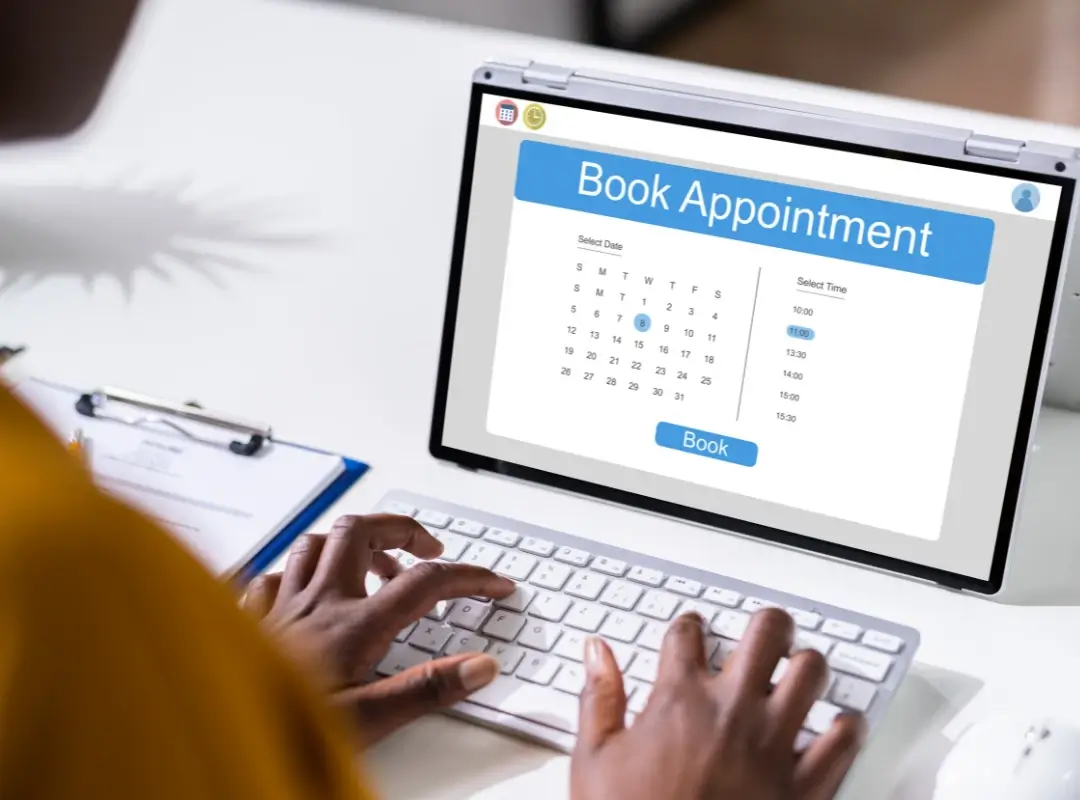
If you only do one thing, do this: place video proof where doubt peaks.
Below is the order I’d prioritize for most service businesses.
Landing page before Calendly (primary lift)
This is your biggest lever.
Your landing page (or “book a call” page) is where people decide if they even want to click into Calendly.
What works best:
- A 15–25 second clip right near your primary CTA
- A headline that matches the viewer’s intent (“Talk to a CFP in 15 minutes” / “Get a 2nd opinion on your labs”)
- One specific result line in the first 3 seconds (front-load the good stuff)
If you want a quick swipe file of placements across site + email, this guide on where to place video testimonials for conversions is a solid reference.
Confirmation redirect page (proof stack plus next step)
After someone books, don’t drop them into a void.
Send them to a confirmation redirect page that says, essentially: “You made a smart choice, here’s what to do next.” It’s like giving your buyer’s remorse zero oxygen.
Your proof stack can be:
- Clip #1: “This was easier than I expected.”
- Clip #2: “Here’s the result I got.”
- Clip #3: “Here’s what the first call felt like.”
Then give one clean next step: fill out a short intake form, add the meeting to their calendar, or watch a 60-second “what to expect” video.
Reminder emails (no-show reduction)
No-shows aren’t usually about disrespect.
They’re about life. Kids, patients, closings, a last-minute fire drill at work… and suddenly your meeting gets ghosted.
A reminder that includes a short proof clip does two things:
- Reassures them the call is worth it
- Keeps the emotional momentum they felt when they booked
Also: reminders are a deliverability and UX game. If your emails are messy on mobile, people miss them.
Pre-call “what to expect” page (objection removal)
This is where you defuse the unspoken fears.
A pre-call page works especially well for:
- Healthcare practices (privacy, bedside manner, time expectations)
- Financial services (credibility, fees, “are you salesy?”)
- Real estate teams (process clarity, negotiation confidence)
Use 1–2 testimonials that answer: “What happened on the first call?” and “Did you feel taken care of?”
Post-call follow-up (close-rate support)
If your sales cycle is more than one call, testimonials become your quiet closer.
Think of the follow-up email as a second set of footprints in fresh snow, proof that other people walked the path and didn’t fall through the ice.
One well-placed clip can support the rep’s message, handle objections, and keep you top-of-mind. If you’re building this into a sales motion, it helps to align with a consistent video testimonial structure that consistently converts.
3 Proof Workflows (Step-by-Step)
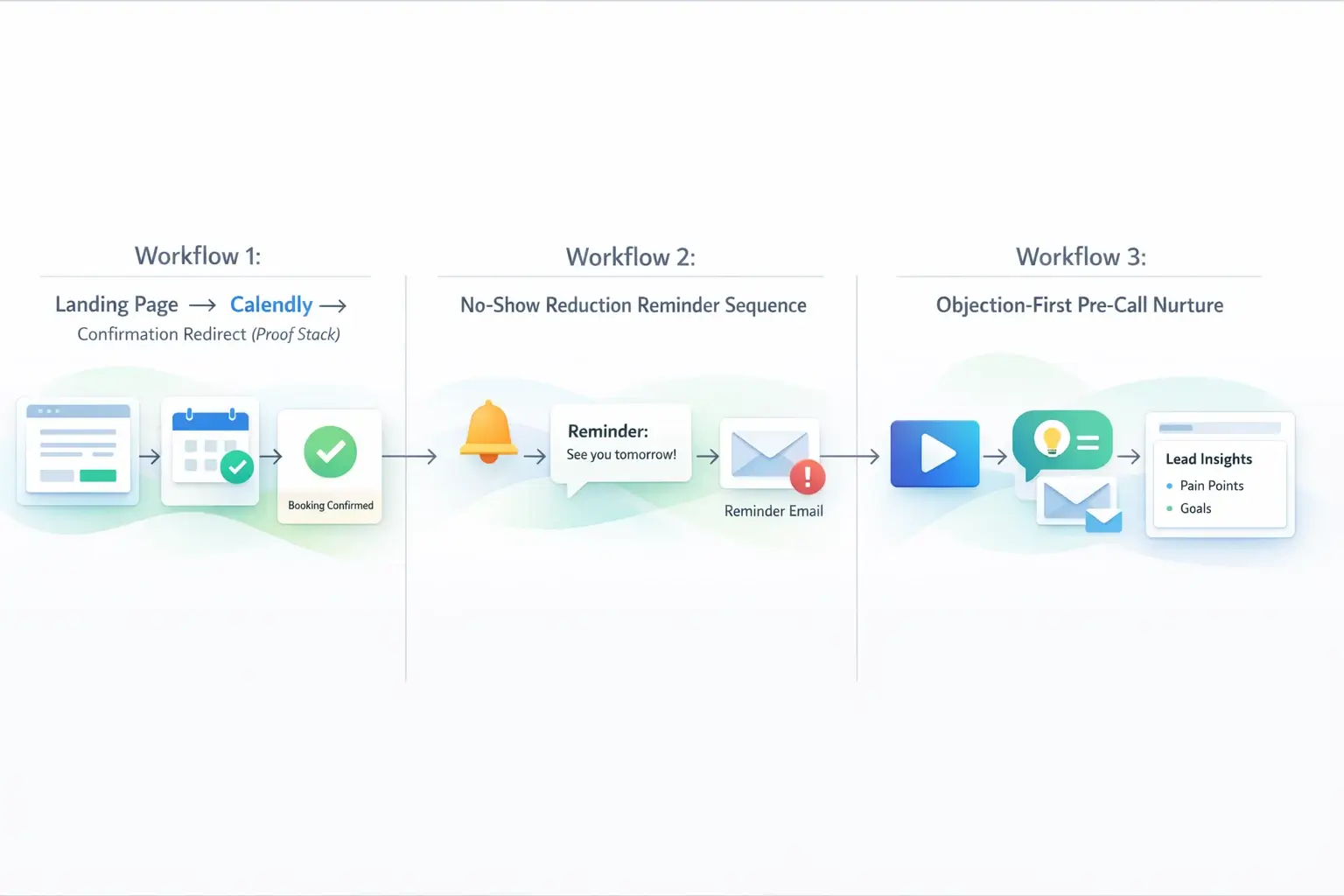
Let’s turn this from “good idea” into something you can launch in a day.
Workflow 1: Landing Page → Calendly → Confirmation Redirect Proof Stack
Goal: Increase booking conversion rate and reduce immediate post-book drop-off.
1. Add a short proof clip above the fold on your landing page.
Keep it tight: a face, a result, a quick emotional release (“I finally felt like someone had a plan”).
2. Send the CTA to Calendly like normal.
Don’t overcomplicate the scheduling step. Calendly is already a familiar pattern.
3. Redirect to a confirmation page that stacks proof + next step.
This is where you reinforce commitment and guide behavior.
Exact page sections
A simple layout that works:
- Top: “You’re booked” + date/time + add-to-calendar button
- Next: “What happens next” (3 bullets max)
- Then:Proof stack (2–3 short clips)
- Bottom: One CTA (intake form / questionnaire / pre-call page)
Pro tip: name your clips by objection so your team can deploy them fast (“anxiety-clip,” “pricing-clip,” “first-call-clip”). It sounds nerdy… and it saves you from hunting through a Google Drive dumpster fire later.
Asset checklist (3 clips)
You only need three clips to start:
- Outcome clip (15–25s): specific win and timeline
- Experience clip (15–25s): what it felt like working with you
- Expectation clip (15–25s): what the first call was like
If you’re thinking, “Cool, but I don’t have time to direct interviews and edit footage,” that’s exactly why we built Share One.
With Share One, you don’t chase clients, write weird scripts, or learn lighting. Our video testimonial service uses trained human interview directors (real people, not bots) to pull out authentic stories, then we deliver polished, on-brand video testimonials you can drop into your funnel.
A quick example from the field: one service founder (professional services, multi-state, busy, skeptical, allergic to fluff) swapped a text-only “Book a Call” page for a simple landing page with a 20-second client clip + a proof stack on the confirmation redirect. Within a few weeks, they saw more booked calls and fewer “Can you remind me what we’re doing?” emails. Not glamorous, but it cut the back-and-forth and made the first call warmer.
If you want to systematize this end-to-end, this is the operating manual I’d follow: a scalable video testimonial workflow.
Workflow 2: No-Show Reduction Reminder Sequence
No-shows sting because they’re expensive in two ways: lost revenue and lost energy.
This workflow is for the businesses where the calendar looks full… but the Zoom room is lonely.
Cadence recommendations
A clean cadence that works for most appointment types:
- Immediately after booking: confirmation email + calendar invite
- 48 hours before: reminder + “what to expect” link (if applicable)
- 24 hours before: reminder + one short proof clip
- 1 hour before: quick SMS reminder (especially for mobile-first audiences)
If you’re in healthcare or finance, keep the reminders compliant, avoid sharing sensitive details, and don’t imply outcomes you can’t ethically claim.
Copy blocks (email and SMS)
Use this structure (short, human, not salesy):
Email (24 hours before):
Subject: Your call tomorrow, quick 20-sec story
Body:
Hey {{FirstName}}, you’re all set for tomorrow at {{Time}}.
If you’re wondering what this will be like, here’s a quick 20-second clip from a client who started in the same place you are now. Then you’ll know what to expect before we talk.
Button: Watch the short clip
PS: If anything changed, you can reschedule here: {{CalendlyRescheduleLink}}
SMS (1 hour before):
“Hey {{FirstName}}, quick reminder: we’re on at {{Time}}. Here’s the link: {{MeetingLink}}. (If you want a quick preview of what we’ll cover, this 20-sec clip is helpful: {{VideoLink}})”
Tiny tweak that helps: make the clip feel like a favor to them (“so you know what to expect”), not marketing to you (“watch our testimonial…”).
Workflow 3: Objection-First Pre-Call Nurture
This is the workflow for when people book… but show up guarded.
You can feel it in the first two minutes:
- arms crossed (even on Zoom somehow)
- rapid-fire questions
- “So… what do you do exactly?”
A pre-call nurture sequence (or page) answers objections before they harden.
Pricing objection
People don’t only fear the price.
They fear paying and still being stuck.
Use a clip that anchors ROI in plain language:
- “I paid X, but I saved Y hours a week.”
- “We stopped wasting money on Z.”
- “This paid for itself after two closings / three retained clients.”
If your sales team handles this daily, arm them with a library of clips, this guide on video testimonials for sales teams shows how to plug proof into follow-ups without making reps feel like they’re spamming.
Trust objection
Trust objections show up as “I’m just shopping around.”
Translation: “I don’t feel safe choosing yet.”
Use testimonials that spotlight:
- professionalism and process (“They were on time, organized, and clear.”)
- care and communication (“I never felt judged.”)
- credibility markers (years in business, certifications, without turning the video into a resume)
Also, remember your page experience matters. Slow pages and jumpy layouts quietly erode trust. For the technical side of “don’t lose people because your site feels sketchy,” Google’s guidance on performance and search best practices at Google Search Central is worth a skim.
“Will this work for me?” objection
This is where similarity wins.
Match the viewer to the storyteller:
- First-time homebuyer → first-time homebuyer clip
- High-income W2 professional → “I didn’t have time to deal with this” clip
- Postpartum mom with labs all over the place → “I felt unheard until…” clip
If you serve multiple niches, create a simple routing page: “Pick the story closest to you.” It’s weirdly comforting, and it lets prospects self-select into the proof that hits home.
Testimonial Video Specs for Booking Funnels
You’re not making a documentary.
You’re making a decision easier.
Here are specs that consistently perform in booking funnels.
15–25s proof clips vs 60–90s story proof
Use two formats for two jobs:
- 15–25 seconds: fast proof for landing pages, confirmation pages, reminders
- 60–90 seconds: deeper story for pre-call nurture, sales follow-ups, and “about” pages
Rule of thumb: if the viewer is one click away from Calendly, keep it short. If they’ve already booked or they’re evaluating, you can earn a little more attention.
Captions and transcripts (accessibility and machine extraction)
Captions aren’t optional anymore.
- People watch on mute (especially on phones in waiting rooms, open offices, or, let’s be honest, the school pickup line).
- Captions improve comprehension and completion rates.
- Transcripts give search engines real text to understand (and they help you reuse quotes in email and on-page copy).
If you want to go deeper on building clips that don’t ramble, start here: high-converting video testimonial guidance.
Thumbnail strategy and microcopy
Your thumbnail is the “first impression of the first impression.”
What works:
- A real face (not a logo)
- Eye contact if possible
- 3–6 words of benefit-driven microcopy
Examples:
- “Booked. Showed up. Closed.”
- “My first call was easy.”
- “We saved 10 hrs/week.”
And keep it mobile-first: big text, high contrast, no tiny lines that disappear on a 6-inch screen (15 cm).
Measurement (KPIs)
If you can’t measure it, it becomes “that marketing thing we tried once.” Let’s not do that.
Booking conversion rate
Definition: the percent of visitors who land on your booking page and schedule.
Track it with:
- landing page views → Calendly bookings
- UTMs on your “Schedule” button links
- A/B tests: page with proof vs page without proof
A practical starting goal: improve by a few percentage points, then iterate. Small lifts compound fast when your traffic is consistent.
Show rate and no-show rate
Definition: the percent of booked calls that happen.
Track:
- total bookings
- attended calls
- reschedules
Then compare cohorts:
- people who received proof-based reminders vs standard reminders
If you run a practice or team where each no-show equals a dead hour, this KPI is found money.
Close rate
Definition: the percent of attended calls that become customers.
This is where objection-first proof shines.
Track close rate by:
- lead source
- service line / offer
- which proof assets were sent (yes, you can log this in your CRM)
You’ll start seeing patterns like: “When we send the ‘first call felt safe‘ clip, close rate climbs for healthcare leads,” or “When we send the ROI clip, finance prospects stop stalling.”
Common Mistakes
These are the ones I see over and over, usually from smart, busy teams.
- Using one generic testimonial for everyone. If it doesn’t feel like “someone like me,“ it doesn’t land.
- Making videos too long for the moment. A 2-minute clip on a reminder email is a big ask. Save long-form for nurture.
- Burying the best line at the end. Put the payoff in the first 3–5 seconds. Attention is expensive.
- Skipping captions. You lose mobile viewers instantly (and you lose the text layer that helps with accessibility and SEO).
- Treating Calendly like the whole funnel. Calendly is the scheduling step. The conversion happens before (belief) and after (commitment + follow-through).
- Not tracking anything. If you don’t tag your links and watch the numbers, you’ll never know whether proof helped, or whether your reminders did.
- Over-scripting the customer. The “too polished” vibe can backfire. A tiny stumble or laugh often increases trust, because it feels human.
- Letting operations kill momentum. The #1 bottleneck isn’t gear, it’s getting the right customers recorded, edited, and deployed consistently.
Map Your Calendly Funnel Plan with Share One
If your Calendly link is the door, video testimonials are the person inside saying, “You’re in the right place, come on in.” They reduce booking friction, keep people committed after they schedule, and cut no-shows by reminding prospects (in a human way) why they booked in the first place.
Start simple: one short clip on the landing page, a proof stack on the confirmation redirect, and a reminder that includes a 20-second story. Then watch your booking rate, show rate, and close rate like a hawk, because that’s where the truth lives.
And if the idea of chasing clients for videos makes you want to take a nap… we get it. Share One is a video testimonial service built for busy founders and teams who want authentic, polished testimonial videos without the awkward asks or tech hassle.
Frequently Asked Questions
Can you add video testimonials directly in Calendly?
You cannot embed video testimonials directly inside Calendly’s native booking interface. Instead, testimonials are added before or after the booking step. The most effective placements are on the landing page that links to Calendly and on the confirmation redirect page after a booking is completed, where proof reinforces commitment.
Where should testimonials go in an appointment booking funnel?
Testimonials work best at three points: before booking to reduce hesitation, immediately after booking on the confirmation redirect page to reinforce the decision, and inside reminder emails or pre-call pages to reduce no-shows. Each placement addresses a different form of booking friction across the funnel.
What length of testimonial converts best for booked calls?
Short testimonials between 15 and 25 seconds convert best for booked calls. These clips are easy to consume, focus on a single outcome, and fit naturally near booking buttons or in reminder messages. Longer testimonials work better for pre-call nurture or objection-handling pages, not initial booking decisions.
How do video testimonials reduce no-shows?
Video testimonials reduce no-shows by reinforcing trust and commitment after a booking is made. When prospects see proof from people like them in confirmation pages or reminders, it reduces second-guessing and perceived risk. This social reinforcement increases psychological ownership of the appointment and improves show rates.