Klaviyo Flow Video Testimonials: Where to Place Proof in Email for More Revenue
Klaviyo flow video testimonials: placement rules, 3 copy/paste workflows, email-friendly specs & KPIs to close the trust gap and lift conversions fast.
If your Klaviyo flows are getting opens but not purchases, you don’t have an “email problem”, you’ve got a trust gap. Visitors who see testimonials are more likely to convert and video makes that belief hit faster because your customer’s face, voice, and tiny pauses feel real (the stuff no headline can fake). If you’re in healthcare, finance, or real estate, where credibility is oxygen, smartly placed video testimonials can help you stand out, lift conversions, and even boost SEO signals like engagement and dwell time…without adding hours to your week. Let’s make your automated emails feel less like marketing and more like a reassuring friend who says, “Yep, this works, I tried it.”
Key Takeaways
- Klaviyo flow video testimonials close the trust gap by showing real faces, voices, and outcomes that make hesitant subscribers feel safe enough to buy.
- Place video testimonials where they answer the next objection—welcome for trust, abandoned cart for risk reversal, post‑purchase for reassurance and usage, and winback for renewed belief.
- Use one targeted testimonial per email and position the thumbnail close to the primary CTA (especially on mobile) so customers don’t have to hunt for proof.
- Follow email-safe specs: don’t embed video, use a linked thumbnail, keep most clips 15–30 seconds (or ~60 seconds for high-consideration buys), and front-load the strongest line in the first 3–5 seconds.
- Build an advocacy loop by collecting fresh clips after a customer’s first success moment, tagging by persona/objection/product, and rotating assets quarterly (or monthly for high-volume flows) to keep Klaviyo flow video testimonials converting.
- Prove ROI with flow-level A/B tests and track CTR, conversion rate, revenue per recipient, time-to-purchase, plus downstream AOV and LTV to measure compounding impact.
What This Page Covers (and What It Doesn’t)
You’re here for Klaviyo flow video testimonials, not a theory lecture, and definitely not a “sprinkle proof everywhere” pep talk.
This page covers:
- How to use video testimonials inside live Klaviyo flows (welcome, cart, post‑purchase, winback)
- Placement rules (where the proof goes, how close to the CTA, and how much is too much)
- Simple workflows you can copy/paste into your automations
- Specs that work in email (thumbnails, clip length, captions, deliverability)
- KPIs to watch so you can prove ROI to yourself (or your CFO brain)
This page doesn’t cover:
- A review of Klaviyo itself (Klaviyo’s great, just not the point today)
- Full video production theory, lighting setups, or “become a filmmaker” advice
- Non‑Klaviyo channels (ads, web pages, social)…though you’ll want to repurpose later
If you want a bigger “map” of how proof fits across the customer journey (not just email), this guide on where to place customer proof for conversions gives you the wider playbook.
One more promise: we’re focusing on ecommerce-style flow logic you can adapt even if you sell services. (A real estate team’s “abandoned cart” is a half-finished consultation form: a clinic’s is a stalled booking. Same psychology.)
Why Video Social Proof Converts in Email
Email is sneaky-powerful because it’s private. It lands next to your customer’s family texts, calendar pings, and flight updates. That means trust matters more, because your message isn’t competing on a billboard… it’s sitting in their pocket.
Here’s the practical difference:
- Reviews answer, “Is it good?” (stars, short text, quick validation)
- Video testimonials answer, “Is this good for someone like me?” (tone, emotion, context, outcomes)
And video speeds up “trust velocity.” When someone hears a real person say, “I was nervous about the cost… then it paid for itself,” it’s like watching fog lift off a windshield.
Definition Box: Risk Reversal + Advocacy Loop
Risk reversal is when your email lowers the perceived “what if this goes wrong?” cost.
- Ecommerce example: “Didn’t fit? Easy returns.”
- Service example (healthcare/finance/real estate): “Here’s what the process looks like, and here’s a patient/client/homebuyer who felt the same nerves, and how it turned out.”
Advocacy loop is the compounding system:
- Someone buys
- You capture their story at the right moment
- You redeploy that story into future flows
- New customers buy faster because the proof is fresher and more specific
It’s not a one-off “nice video.” It’s infrastructure.
Where Video Testimonials Belong in Klaviyo Flows

Most people put video testimonials where they feel right (usually the bottom of an email, as decoration). The better approach: place proof where it answers the next obvious objection.
Below is a simple “flow → goal → proof type” map you can use.
Klaviyo flowWhat the reader is thinkingBest proof formatYour placement rule
Welcome series“Can I trust you?”15–30s credibility clipAfter value prop, before the first big CTA
Abandoned cart“Will this work for me?”Risk-reversal clip1 testimonial per email, close to CTA
Post-purchase“Did I make the right call?”Usage/implementation clipLead with reassurance, then teach
Winback“Why should I come back?”Peer reminder + outcomeMatch testimonial to what they bought
Welcome Series (Trust Stacking)
In your welcome flow, you’re not selling features, you’re selling safety.
A strong pattern is:
- Clear value proposition
- One short customer clip that reinforces that promise
- CTA
Founder video can work, but customer-led proof usually lands harder because it’s not “you telling people you’re great.” It’s like hearing a neighbor recommend a contractor while you’re both standing in the driveway.
If you want a bigger funnel view (welcome → purchase → referral), this video testimonial funnel strategy makes it easy to match proof to each stage without guessing.
Abandoned Cart (Risk Reversal)
Cart abandonment emails often scream urgency: “Your cart is expiring.”
But if someone’s hesitating, it’s usually one of these:
- “I’m not sure it’ll work for my situation.”
- “I don’t want to regret spending this.”
- “I’m worried it’s a hassle to start.”
So use a single, specific video testimonial that names the objection.
Placement rule I like: put the thumbnail above the button or within a thumb’s scroll (roughly the top 6–8 inches / 15–20 cm on mobile). Don’t make them hunt.
And keep it to one proof asset per email. Two clips in one message feels like a pitch deck.
Post-Purchase Upsell (Confidence + Usage)
This is the most underrated place for video testimonials.
Right after purchase, your buyer is in that “wait… did I do the right thing?” window. A good post‑purchase clip reduces remorse and sets up the next step:
- “Here’s how I used it in week one.”
- “Here’s what surprised me.”
- “Here’s the outcome after 30 days.”
For service businesses, think: “Here’s what the first appointment felt like,” or “Here’s how onboarding went.” Sensory detail matters. The squeak of a clinic chair, the quiet pause before someone says, “I was terrified”, that’s the stuff that sticks.
Winback (Credibility + Reminder)
Discounts work… until they train your list to wait.
A winback flow is better when it restarts belief:
- Remind them what they cared about
- Show someone like them getting the result
- Then offer a clean next step
Pro tip: segment by last product/service purchased and match the testimonial accordingly. A skincare winback clip won’t move a supplement buyer. A “stress-free closing” story won’t help someone who got stuck choosing a lender.
When you treat proof like a matching game instead of a megaphone, winbacks stop feeling desperate and start feeling persuasive.
3 Revenue Workflows (Step-by-Step)
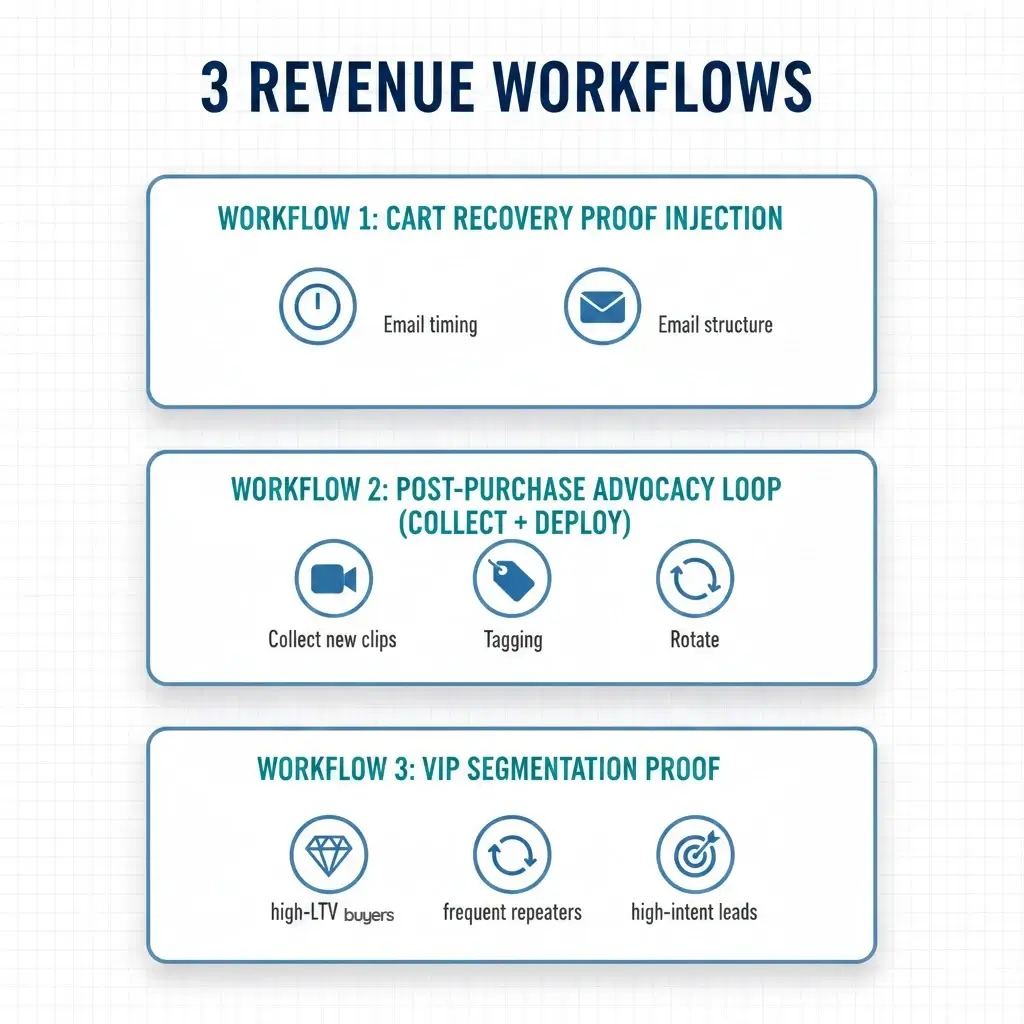
These are built to be measurable and repeatable, because “we added a video” isn’t a strategy.
Workflow 1: Cart Recovery Proof Injection (Template)
Goal: convert hesitation into action without leaning on discounts.
Trigger: Added to cart → no checkout within your normal window (commonly 1–4 hours).
Timing suggestion:
- Email 1: 1 hour later (simple reminder)
- Email 2: 12–18 hours later (add proof)
- Email 3: 36–48 hours later (proof + FAQ)
Email 2 structure (the proof injection):
- Headline: name the objection
- One sentence of empathy (“If you’re wondering whether this is worth it… you’re not alone.”)
- Video testimonial thumbnail (15–30s)
- 2–3 bullets pulling exact phrases from the testimonial
- CTA button
Copy framework you can steal:
- “I almost didn’t buy because ___.”
- “What changed my mind was ___.”
- “The result was ___.”
If you want a plug-and-play story structure for those clips, this video testimonial framework that converts is the cleanest way I’ve seen to avoid rambling footage.
Workflow 2: Post-Purchase Advocacy Loop (Collect + Deploy)
Goal: turn happy customers into future revenue assets, without awkward begging.
Here’s the truth: asking for testimonials feels weird when it’s framed as a favor. It feels easy when it’s framed as celebrating their win.
When to ask (simple rule): ask after the first meaningful success moment.
- Ecommerce: after delivery + first use (often 7–14 days)
- Services: after the first clear milestone (first appointment win, first month ROI, first “we got the offer accepted” moment)
Incentives that don’t bias feedback:
- Offer a small thank-you for their time (gift card) regardless of sentiment
- Or donate to a charity (people love this, and it keeps the request classy)
Deploy loop:
- Collect new clips monthly
- Tag them by persona + objection + product/service
- Rotate them into flows quarterly so your proof stays fresh
If you’re building this from scratch, you’ll like the practical “no chaos” approach in this scalable testimonial workflow.
And yes, this is exactly where Share One is different: we use trained human interview directors so your customer doesn’t sound like they’re reading a hostage note. You get authentic, usable stories, polished and ready for email.
Workflow 3: VIP Segmentation Proof
Goal: increase repeat purchase, referrals, and LTV by reinforcing identity.
Segment: high-LTV buyers, frequent repeaters, or high-intent leads (you pick your definition).
Move: show proof from “people like them,” not the general public.
Examples:
- VIP skincare customers see a clip from another long-term customer discussing routine and consistency
- High-net-worth finance clients see a story about clarity, confidence, and the decision process
- Real estate repeat investors see a clip about speed, communication, and outcomes
Why it works: VIPs aren’t buying features: they’re buying certainty and status. Your testimonials should mirror that.
A practical note: this workflow is where done-for-you helps most. Matching clips to segments is a time sink, unless your library is tagged and organized like an asset system (which is how we build it at Share One).
Testimonial Video Specs for Email
Email has rules. Ignore them and your beautiful video becomes a deliverability problem.
Thumbnail + Link vs Embed (Deliverability + UX)
Don’t embed full video in the email body.
It can:
- hurt deliverability
- load weird on mobile
- break across email clients
Do this instead:
- Use a clean thumbnail with a “play” icon
- Link to a landing page (or a lightbox-style page) where the video loads fast
- Put a short caption under it: “Watch Sarah’s 22‑second story”
Bonus: that landing page can carry extra proof (text quotes, a guarantee, an FAQ) so the click has somewhere persuasive to land.
15–30s Clips vs 60s Story Proof
15–30 seconds wins when:
- the goal is a fast decision (welcome, cart, winback)
- the objection is simple (“Will this work?”)
- you want high click-through on mobile
60 seconds still works when:
- the purchase is high-consideration (finance packages, elective healthcare, high-end services)
- the viewer needs context (before/after, timeline, process)
Editing tip: front-load the gold.
If the best line is “I saved $4,200 in 3 months,” don’t make us wait until second 47. Put it in the first 3–5 seconds, then backfill the story.
Captions and Transcripts (Accessibility + Extraction)
Most people watch on phones, often with sound off.
So captions aren’t “nice to have.” They’re the difference between a video that converts and a video that’s silently ignored.
Transcripts also give you:
- instant email copy (pull exact phrases)
- keyword-rich snippets for landing pages
- short quotes for your winback subject lines
If you’re collecting clips at scale, you’ll want a consistent system for prompts, permissions, and follow-ups. This guide on how to collect video testimonials at scale lays out the simplest approach I’ve used without turning your week into a scheduling nightmare.
Measurement (CTR, Conversion Rate, AOV, LTV)
If you can’t measure it, it’s just vibes.
Here’s the clean measurement stack for Klaviyo flow video testimonials:
- CTR (click-through rate): did the proof earn attention?
- Conversion rate: did the proof earn action?
- AOV (average order value): did proof increase basket size or add-ons?
- LTV (lifetime value): did proof improve retention and repeat behavior over time?
Flow-level vs campaign-level:
- Flow-level measurement is cleaner because the trigger and intent are consistent.
- Campaigns are noisier (seasonality, list fatigue, promos, holidays, hello Black Friday chaos).
A simple attribution workaround:
- Create a version of the email with the testimonial thumbnail
- Create a version without it
- A/B test within the flow (or rotate weekly if your volume is low)
Watch differences in:
- click rate on the primary CTA
- revenue per recipient
- time-to-purchase (this one’s sneaky valuable)
One more thing: don’t obsess over a single send. Video proof compounds when it’s refreshed and matched to the right stage. Think like a portfolio manager, not a scratch-off ticket.
Common Mistakes
I’ve seen smart teams sabotage great clips with small execution mistakes. Here are the big ones, plus what to do instead.
1) Treating video like homepage decoration
If your clip is below three product blocks and a wall of text, it’s a tree falling in the forest.
Fix: put it where doubt peaks, right before the CTA in cart and welcome emails.
2) Using generic testimonials
“Great service, highly recommend.” is the email equivalent of room-temperature oatmeal.
Fix: collect testimonials that include:
- the initial fear (“I worried about…”)
- the turning point (“Then I noticed…”)
- the measurable result (“So I saved / earned / improved…”)
3) Overloading one email with proof
Two videos, three quotes, five badges… now your email feels like a used car lot.
Fix: one testimonial per email. Rotate over the sequence.
4) Not refreshing assets
A testimonial from 2019 about a discontinued offer isn’t “evergreen.” It’s confusing.
Fix: refresh quarterly for key flows, monthly for your highest-volume flow.
5) Forgetting consent and compliance
If you’re in healthcare: HIPAA isn’t a footnote. It’s a cliff.
Fix: use written permission, clear usage rights, and compliant scripting. This is another reason done-for-you matters, Share One’s process is designed to capture authentic stories while staying respectful and compliant.
If you want your video library to feel organized (instead of a random folder called “testimonials_FINAL_final2”), build around a consistent workflow and tagging system. That’s the difference between “we have videos” and “our videos drive revenue.”
Turning Testimonials Into Email Revenue Assets
The win isn’t “adding a video” to your Klaviyo flow. The win is building a system where video testimonials show up at the exact moment your customer needs reassurance, welcome for trust, cart for risk reversal, post‑purchase for confidence, winback for belief.
Do that, and testimonials stop being a marketing accessory. They become revenue infrastructure that compounds with every new story you collect.
If you’re weighing options, here’s the honest take: DIY tools can work if you have time, editing help, and a clear prompt system. But if you’re busy (and you are), a done‑for‑you partner like Share One can get you higher-quality clips faster, with trained human interview directors who pull out real moments instead of scripted lines.
Now go make your customers the hero, and let your flows sell with heart.
Get an Email Testimonial Asset Pack
Want us to turn your customer wins into email-ready video testimonials you can drop into Klaviyo this month?
Get an Email Testimonial Asset Pack from Share One, polished clips, thumbnails, captions, transcripts, and deployment guidance built for deliverability and conversions.
Book your ecommerce proof audit and we’ll map your best placements and workflows, fast.
Frequently Asked Questions
Where should video testimonials go in Klaviyo flows?
Video testimonials work best at points of decision friction inside Klaviyo flows. Place them after the core value proposition but before or directly under the primary CTA. Priority flows are welcome series, abandoned cart, post-purchase upsell, and winback emails where trust and risk reduction directly impact revenue.
Which flow benefits most from video proof?
Abandoned cart flows usually see the fastest lift from video proof. Shoppers already showed intent, so a short testimonial addressing objections or outcomes can tip the decision. Post-purchase flows benefit next, especially for increasing upsells and repeat purchase confidence rather than first-time conversion.
What testimonial length converts best in email?
Short clips convert best in email. Aim for 15 to 30 seconds focused on one clear outcome or objection. Email readers scan quickly, often with sound off, so concise testimonials with captions outperform longer story-driven videos that work better on landing pages.
How do you track revenue influenced by testimonials?
Track testimonial impact at the flow level, not just the email level. Compare conversion rate, AOV, and revenue per recipient before and after adding proof. Use holdout emails without testimonials or duplicate flows to isolate lift. Direct attribution is imperfect, but directional revenue impact is measurable.
How many testimonials should a brand use in email?
Use one testimonial per email. Multiple testimonials dilute attention and reduce clicks. Across your entire lifecycle system, most brands need 8 to 15 strong clips segmented by product, objection, and customer type. Quality, relevance, and rotation matter more than volume in email.