The Video Testimonial Workflow That Scales Without Chaos
Use this proven 8-step video testimonial workflow to turn clients into high-converting proof with smart triggers, tools, approvals, and SEO use cases.
If you knew that people who watch customer videos on your site are 80% more likely to become paying clients, how fast would you start recording them?
In healthcare, finance, and real estate, especially, your prospects don’t just want features; they want to see someone like them on screen saying, “This worked, it was worth it, and I’d do it again.” Those short, 2‑minute‑or‑less video testimonials quietly do three jobs at once: build trust, boost conversions, and keep Google happy by increasing time on page.
The catch is, random one‑off videos won’t cut through a crowded market or your busy schedule. You need a repeatable video testimonial workflow that turns happy clients into proof on autopilot, so in a minute, you’ll get a simple 8‑step system, plus real‑world tips and a peek at tools (and even Share One) that make the whole thing way easier.
Key Takeaways
- A strategic video testimonial workflow starts with mapping proof gaps and prioritizing stories that directly tackle your most significant sales objections.
- Trigger-based requests at customer success milestones generate more and better testimonials than random one-off asks.
- Structured, authentic interviews and smart clip extraction turn a single story into multiple short, reusable video assets for different channels.
- Tight approval, packaging, and tagging workflows ensure each video testimonial is compliant, easy to find, and ready for websites, sales outreach, and ads.
- Ongoing measurement and quarterly refreshes keep your video testimonial workflow tied to conversion lift and revenue impact, not just views.
Want to know how to optimize video testimonials with HubSpot? Read our guide, HubSpot Landing Page & Email Video Testimonials.
The Full Video Testimonial Lifecycle
Most teams treat testimonials like a side quest: “Hey, can we get a quick video from this client?” Then things break when you try to scale, no process, no tracking, no reuse.
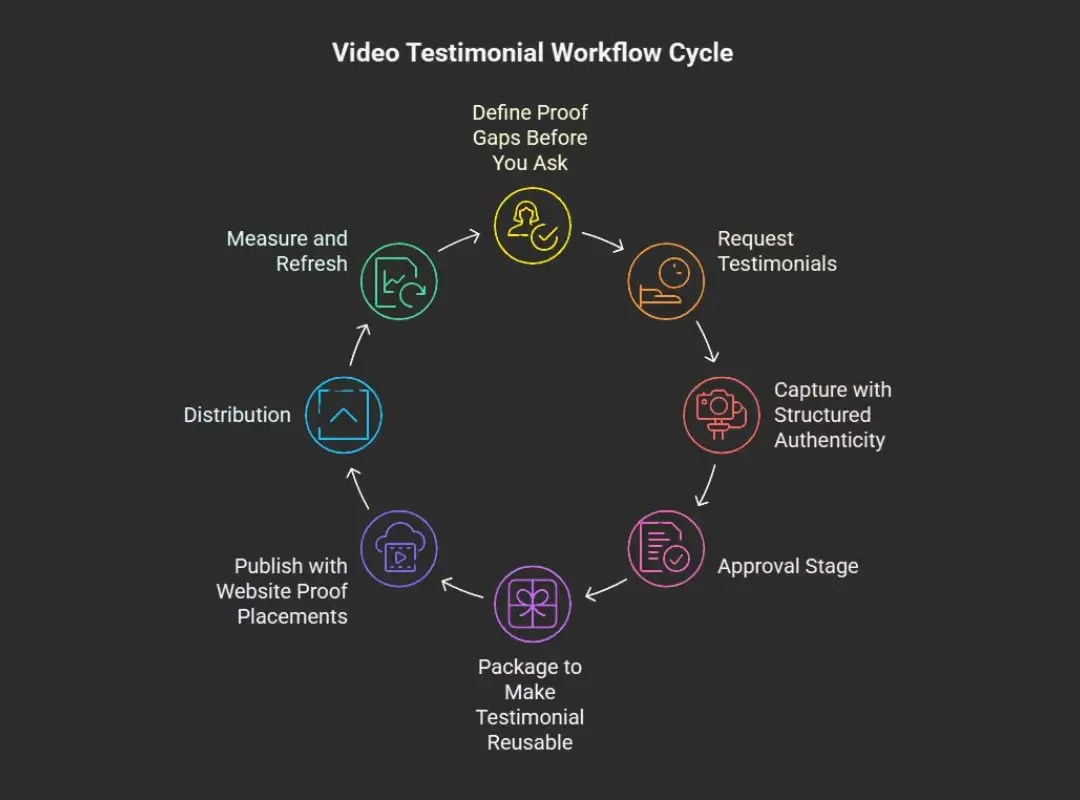
A real video testimonial workflow is more like a loop than a one‑off task:
- You figure out which stories you need (proof gaps).
- You ask the right people at the right time (request workflow).
- You record structured, authentic stories (capture).
- You get approvals safely (especially if you’re regulated).
- You package each video so it’s reusable everywhere.
- You publish it where it moves revenue, not just where it looks pretty.
- You hand it to the marketing and sales team in ready‑to‑use form.
- You track performance, refresh, and repeat.
The tools you choose, whether simple video testimonial tools or a full‑service partner, should support this entire lifecycle, not just the “hit record” part.
Take a peek at our Video Testimonial Implementation to learn more about rolling out the workflow.
Step 1 — Define Proof Gaps Before You Ask
Before you record a single second, you need to know what proof you’re missing. Most people skip this, then wonder why their shiny videos don’t move the needle.
Build Your Objection Map
Start with the uncomfortable questions your prospects already ask you.
Grab a notepad (or a Google Doc) and list the top objections you hear in sales calls:
- “This seems expensive.”
- “How long will it take to see results?”
- “Is this safe/compliant in my industry?”
- “What if it doesn’t work for my situation?”
Then match each objection to the kind of story that would calm it down.
For example, a financial planner might map:
- Price → client talking about long‑term gains vs. fees.
- Risk → client explaining how they slept better once the plan was in place.
Now your goal with video isn’t “get more testimonials,” it’s to get the exact stories that kill these objections.
Build Proof Categories
Next, you slice your world into categories that matter to buyers.
The basics:
- Industry / vertical – cardiology clinic vs. dental practice: first‑time homebuyers vs. investors.
- Persona/role – physician, COO, CFO, broker, loan officer.
- Use case – faster onboarding, more qualified leads, fewer no‑shows, smoother closings.
- Risk/objection type – price, complexity, compliance, timing.
When someone is about to wire you a large sum or sign a treatment plan, they want to see a mirror, not a montage. Proof categories help you make sure you have “one of them” for each key segment.
Create a Proof Backlog
Now you turn all that into a simple backlog, a to‑do list of missing stories.
It can be a basic spreadsheet with columns like:
- Industry
- Role
- Use case
- The main objection it addresses
- Dream quote or outcome (e.g., “Closed three extra deals in 60 days”)
- Priority (1–3)
Here’s the rule: impact beats recency.
Don’t chase the last happy customer who emailed you: chase the story that will unblock the biggest deals. When you later look at video testimonial tools or even the best video testimonial software 2025 has to offer, this backlog becomes your marching orders, not just “nice to haves.” Your existing written reviews are also a built-in source of pre-validated candidates. If you haven’t mined them yet, this guide on how to turn written reviews into video testimonials fits neatly into your request workflow as a warm, low-friction starting point.
Step 2 — Request Workflow (Trigger-Based, Not Random)
You know who you want. Now the question is when and how you ask.
Random asks feel needy. Triggered asks feel natural.
Best Trigger Events (Milestones)
Ideal moments to invite a video:
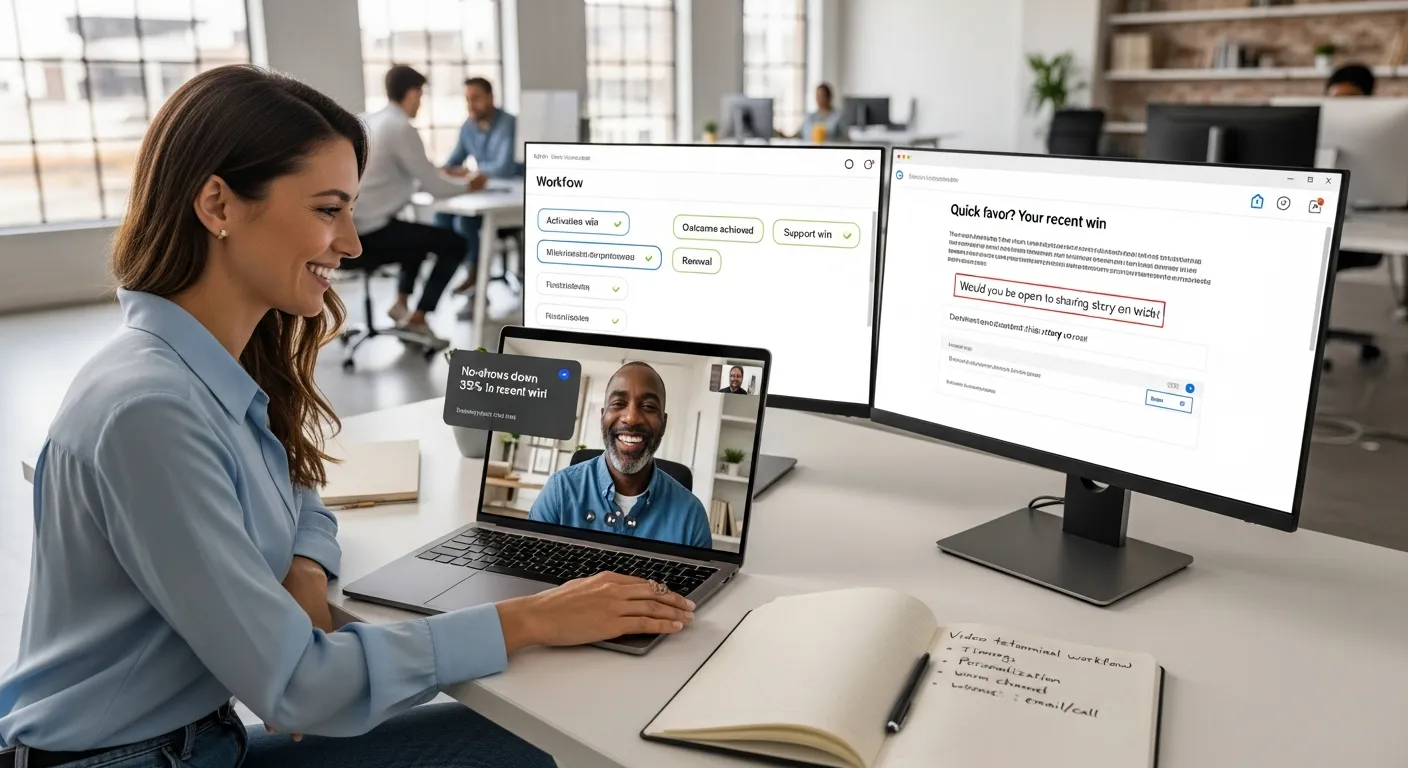
- Activation win – “We just launched your new patient portal this week.”
- Measurable outcome – “You cut no‑shows by 32% in three months.”
- Renewal or expansion – “You chose to stay and even upgrade your plan.”
- Support win – “Our team just solved that integration issue, and you’re back on track.”
If they’re already smiling on Zoom, that’s your cue.
Request Channels
Use the channels that already feel warm:
- A short, personal email from their primary contact.
- A quick call: “By the way, would you be open to sharing this story on video?”
- A gentle in‑app nudge after a success milestone.
- Event or webinar follow‑ups when they were just on camera anyway.
Human outreach usually beats full automation here, especially in higher‑trust spaces like money and health.
Timing Rules (Avoid Bad Asks)
Don’t ask right after:
- A billing mistake.
- A support escalation.
- A missed deadline on your side.
Give it time to heal or wait until the next clear win. One poorly timed request can burn a lot of goodwill.
Personalization Fields
The fastest way to tank your response rate is to sound like a robot.
In your invite, reference:
- Their name and company.
- The specific result they just got.
- The product or service they use.
- Why their story would help someone like them.
Example:
“You cut your average closing time from 60 days to 35. A quick 2‑minute video on how you did that would really help other first‑time buyers wondering if this process is worth it. Would you be open to recording one?”
That feels like a compliment, not a chore.
Learn how to cut no-shows and boost bookings with this guide to Calendly booking funnel video testimonials.
Step 3 — Capture Workflow: Structured Authenticity
This is where a lot of teams overthink it: fancy cameras, intimidating scripts, studio lighting.
In reality, a newer iPhone, good natural light, and a clear structure will outperform a stiff studio shoot.
The 5-Part Testimonial Story Structure
Use this simple arc:
- Before – Who are you, and what was life like before?
- Pain – What wasn’t working? What was stressing you out?
- Why this solution – Why us vs. other options?
- Experience – What was it like getting started? Any surprises?
- Outcome + recommendation – What changed, and who would you recommend this to?
You can send these as prompts ahead of time so your client isn’t blindsided. Keep it conversational, let them stumble, laugh, think. Those little imperfections scream real.
Clip Extraction Standards
Think of each recording as a gold mine, not a single statue.
From a 10–15 minute interview, you want:
- Several 15–45 second clips, each focused on one idea: a pain, a result, a myth.
- Clear, standalone quotes like, “We added $40,000 in revenue in 90 days.”
- No vague fluff like, “They’re just great to work with.” Nice, but not usable.
If you work with a service like Share One, this slicing is handled for you; they’ll turn one raw story into a stack of ready‑to‑use proof pieces for your site, emails, and ads.
Step 4 — Approval Workflow (Enterprise-Safe by Default)
If you’re in healthcare, finance, or real estate, you already know: nothing sees daylight without approvals from enterprise teams.
Skipping this step is how great videos end up stuck in “legal limbo” forever.
Approval Roles
On your side:
- Marketing owner – shepherds the video from idea to publication.
- Legal/compliance – checks claims and disclosures.
- Brand/comms – sanity checks tone and visuals.
On your client’s side:
- The speaker ().
- Sometimes their legal or PR team.
Approval Stages
Keep it simple:
- Internal rough cut.
- Send to client with clear, easy edit options.
- Legal/brand review as needed.
- Final version + signed release stored with the file.
Common Reject Reasons + Fixes
- Claims sound too specific or risky → soften with ranges or context.
- Something confidential snuck in → blur, bleep, or trim that line.
- The video feels off‑brand → adjust colors, fonts, thumbnail, or music.
When your workflow bakes this in, approvals go from “scary unknown” to “just another checkbox.” For teams running that workflow across borders, the coordination challenges multiply fast. This guide to global video testimonial production addresses how enterprise brands handle scheduling, localization, and compliance across regions without losing quality or momentum.
Step 5 — Packaging Workflow: Make Every Testimonial Reusable
Raw video sitting in a Dropbox folder is not an asset.
Packaging is what turns one happy client into a complete toolbox of proof.
Standard Proof Bundle Format
For each finished story, aim for a small bundle:
- Full video (usually under 2 minutes).
- 3–8 short clips by theme (pain, outcome, objection, feature).
- Transcript and a few pulled headline quotes.
- A quick summary: who they are, what changed, key numbers.
- A thumbnail that gets clicked.
Tagging Taxonomy (Mandatory)
Tag every asset by:
- Industry.
- Role.
- Use case.
- Funnel stage (awareness, consideration, decision).
- Main objection it helps with.
That way, when a rep says, “I need a video for a nervous first‑time buyer in Phoenix,” they can find one.
Storage Rules
Pick a single home, your CRM, a shared drive, or specialized video testimonial tools.
Set simple rules:
- One source of truth folder or platform.
- Clear file names (e.g., 2025-Dr-Smith-Ortho-NoShow-Reduction).
- Access for both marketing and sales, with rights and releases attached.
In the future, you will be very grateful.
Step 6 — Publishing Workflow: Website Proof Placements
Here’s where the magic starts to show up in your analytics.
The same video buried on a blog vs. featured near your pricing can perform like night and day.
Priority High-ROI Placements
Start with:
- Homepage – one strong, emotional clip above the fold.
- Service/product pages – role‑specific stories next to features.
- Pricing page – objection‑busting clips close to the “Book a call” button.
- Case study hub – your Netflix of proof.
SEO & Accessibility Basics
A few minor details go a long way:
- Add transcripts so search engines can read the content.
- Make sure videos are fast‑loading and mobile‑friendly.
- Always include captions, most people watch with sound off.
These simple tweaks boost SEO and make your stories easy to watch in a waiting room, at a desk, or in line at Starbucks.
Step 7 — Distribution Workflow: Hand-Off, Not Duplication
Once your videos are live, you’re only halfway done. The rest is getting them in front of the right people at the right moment.
Sales Usage
Make it painless for sales to grab the perfect clip.
Ideas:
- Add links to key videos inside email templates and sequences.
- Build small “proof packs” by industry or objection.
- Drop a short, relevant video after a sales call: “Here’s how another client handled the same concern.”
When reps see deals move faster after sharing these, they’ll start asking for more.
Paid Ads & Email
Short testimonials can pull serious weight in:
- Retargeting ads – “Still thinking about us? Watch how Dr. Lee cut no‑shows in half.”
- Nurture emails – plug a 30‑second clip where you’d usually drop a long paragraph.
Rotate creatives so people don’t see the same face 20 times. This is where a service like Share One quietly shines; one interview turns into a whole video testimonial library you can keep refreshing.
Step 8 — Measurement and Refresh Cycle
You’re not recording art films, you’re recording revenue assets.
So you track them like revenue assets.
What to Track
Look at:
- Conversion lift – pages with vs. without video.
- Sales usage – how often reps share specific clips and what happens to those deals.
- Funnel impact – do leads move faster or further when they see certain stories?
Views are nice. Influenced revenue is better.
Quarterly Refresh Cadence
Every quarter, block an hour to review:
- Which videos are doing the heavy lifting?
- Which objections still feel under‑covered?
- Which stories are outdated (old pricing, old branding, irrelevant details).
Then update your proof backlog and schedule 1–3 new captures. That’s it, you’re constantly tightening the system.
Retiring Outdated Proof (Without Deleting URLs)
Don’t nuke old pages if they rank or are linked in emails.
Instead:
- Swap in a new embed on the same URL.
- Add a note like “Updated for 2025,” so visitors know it’s fresh.
- Archive truly outdated clips inside your library, but keep the link alive.
This keeps your SEO intact while your proof stays current, especially handy if someone lands here after reading Share One reviews or older case studies.
Capturing the click is only half the battle; keeping that momentum in your follow-up is what closes the deal. We’ve put together a primer on using ActiveCampaign automation video testimonials to help you turn automated sequences into high-conversion engines.
Final Takeaway: Turn Testimonials Into a Proof System
If your marketing has ever felt like you’re shouting into the void, video testimonials are how you hand the mic to your happiest customers and let them do the convincing.
When you follow this 8‑step video testimonial workflow, proof gaps, smart asks, structured capture, approvals, packaging, publishing, distribution, and refresh, you stop chasing random “nice videos” and start building a proof engine that runs quietly in the background.
Whether you’re using lightweight video testimonial tools or partnering with a human‑first service like Share One (who can handle everything from invites to final edit), the goal is the same: make it easy for your next buyer to see someone like them succeed.
So the next move is simple: pick one proof gap, choose one happy client, and run them through this system. If you want to shortcut the heavy lifting and lean on pros who live and breathe this stuff, start building trust today with Share One and turn your client wins into your most persuasive marketing.
Implement This Video Testimonial Workflow with Share One ➡️
Frequently Asked Questions
Why does a video testimonial workflow matter for businesses and companies?
A clear workflow matters because it prevents one-off requests, lost files, and approval delays. For businesses using testimonials to drive trust and conversions, a defined workflow ensures consistency, compliance, and repeatable results across marketing and sales.
How do we stop this workflow from becoming messy?
Messy workflows happen when testimonials are treated as one-off content. The fix is structure: define clear steps, owners, and standards upfront. Use a single system to request, store, tag, and approve videos. Plan proof needs in advance, capture testimonials in a consistent format, and package each video for reuse so nothing gets lost or duplicated.
When is the best time to ask customers for a video testimonial?
The best time is right after a meaningful success moment such as achieving results, completing onboarding, or renewing. These trigger points feel natural and respectful, not awkward. Asking too early or too late reduces response rates. A good video testimonial workflow ties requests to milestones, not random outreach.
Who owns approvals in a video testimonial workflow?
Ownership should be clearly defined. Typically, marketing manages the overall workflow, legal or compliance reviews claims and permissions, and brand or leadership ensures messaging alignment. Assigning approval roles upfront prevents bottlenecks and protects your business, especially in healthcare, coaching, or regulated industries where testimonials must follow strict guidelines.
How do we tag video testimonials for sales usage?
Tag testimonials based on how sales teams actually use them. Common tags include industry, customer role, use case, objection addressed, and funnel stage. This makes it easy for sales to quickly find the right proof for a specific prospect. Without tagging, even great testimonials rarely get reused effectively.
What’s the difference between a testimonial collection workflow and a testimonial management process?
Collection focuses on how you ask for and record testimonials. Management covers everything after: approvals, tagging, storage, updates, and distribution. Many teams collect testimonials but don’t manage them, which leads to unused assets. A complete video testimonial workflow includes both, so testimonials stay useful long after recording.
How do we measure if our video testimonial workflow is working?
Look beyond views. Track where testimonials are used, how often sales shares them, and whether they influence conversions or deals. Also review freshness, outdated testimonials lose trust. A strong workflow includes regular reviews to update, rotate, or retire videos while keeping URLs and SEO value intact.
Should we build this workflow in-house or use a video testimonial service like Share One?
In-house workflows work for small volumes, but they often break at scale. A video testimonial service like Share One provides built-in structure for requests, approvals, tagging, and reuse without adding complexity. Many teams use a hybrid approach, keeping strategy internal while outsourcing execution to maintain consistency and speed.