Video Testimonials for Sales Teams That Close Deals Faster
Learn how video testimonials for sales teams boost trust, crush objections, and lift close rates with simple clips plugged into each stage of your funnel.
If your reps are still sending long PDFs and hoping prospects read them, you’re leaving money on the table, 72% of customers trust a brand more with positive video testimonials.
In high‑stakes decisions (new doctor, new advisor, new real estate partner), your prospects don’t want more content: they want proof, real people, real results, in a format they can skim on their phone between meetings. That’s where video testimonials quietly do the heavy lifting: they build trust, shrink risk, and even help your SEO by keeping visitors on your site longer.
You’re about to see how to plug these videos straight into your sales process, across discovery, proposals, objections, and renewals, so your team closes more deals without creating a single extra deck or 20‑page case study.
(Want more enterprise-level insights? Dive in deeper with our Enterprise Video Testimonials guide.)
Key Takeaways
- Video testimonials for sales teams turn abstract claims into concrete proof, boosting conversions compared to traditional PDFs and long case studies.
- Map short customer clips to five key sales moments: post-discovery, post-proposal, objection handling, champion enablement, and renewals to reduce risk and build trust at the exact points prospects get nervous.
- Use focused testimonial formats (objection, outcome, implementation, before/after, and role-based clips) so each video answers one specific fear or desired result in under two minutes.
- Build a structured proof library by tagging every video by industry, company size, role, use case, objection type, and deal stage, and surface them directly in your CRM and sales workflows.
- Roll out video testimonials for sales teams in 30 days by first mapping objections, then collecting 5–10 targeted clips, tagging and packaging them into “proof packs,” and wiring them into standard email templates.
- Measure impact beyond views by tracking deal velocity, win rate by segment, objection-related drop-off, and direct prospect references to videos in conversations.
Why Sales Needs Video Proof (Not “More Content”)
Your prospects are drowning in content, whitepapers, one‑pagers, decks, comparison charts. By the time they’re talking to your sales team, they don’t need another attachment: they need a reason to believe you.
And they trust other people like them way more than your marketing copy.
A few truths that really matter for you:
- People lean on peer proof. Around 90% of buyers say recommendations and reviews from other customers influence them far more than ads or what the company says about itself.
- When visitors watch customer stories on your site, they stick around longer, which sends positive signals to search engines and quietly lifts your rankings.
- In late‑stage deals, long text case studies often get ignored. A 45–90 second clip from a peer? That gets watched.
So your goal isn’t “let’s crank out more content.”
Your goal is: let’s put the right proof in front of the right buyer at the exact moment they’re nervous. That’s what these videos do for your sales team.
The 5 Sales Moments Where Testimonials Win Deals
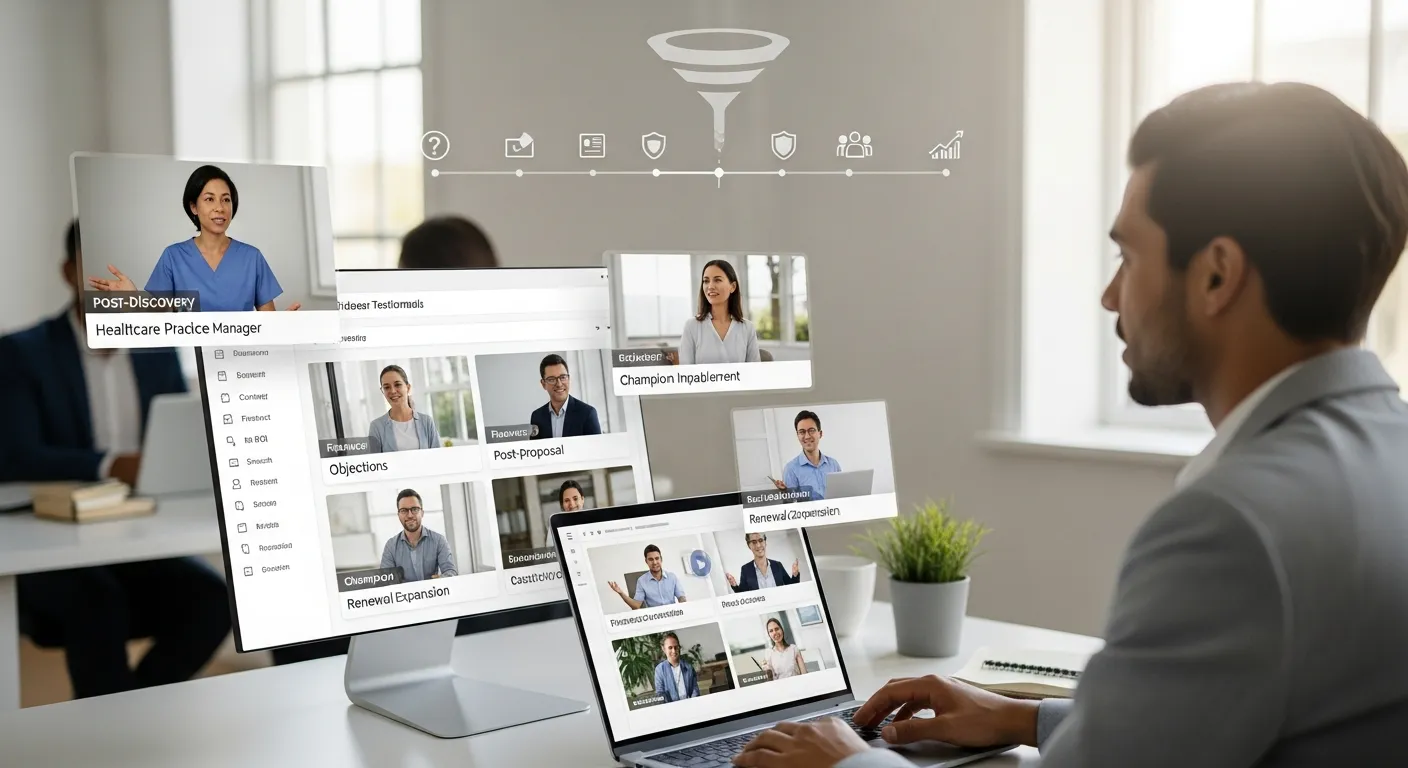
There are a few moments in every deal where your prospect’s stomach does a little flip, “Is this really going to work for us?” If you line up customer proof for those exact beats, everything gets easier for your reps.
Moment 1, After discovery (validation)
You just had a great discovery call. The prospect nodded along, admitted the problem, maybe even said, “Yeah, this is killing us.”
Then they hang up… and the doubt creeps in.
This is where you send a short video from a customer who was in almost the same situation.
Key message you want that customer to say (in their own words): “You’re not the first company with this problem, and fixing it was worth it.”
Think 20–40 seconds, not a mini documentary. One clear before/after. Same industry or similar size business. Your rep can drop it in a follow‑up email with a simple line: “Thought you’d like to hear how another practice/firm handled this.”
Moment 2, After proposal (risk reversal)
Proposal sent.
Now your champion is staring at numbers and terms, imagining all the ways this could blow up in their face.
Here you want proof that:
- Implementation went smoothly.
- The ROI you’re promising is realistic.
So share a clip where a customer says things like, “We were live in under 30 days,” or “We hit payback in six months.” That kind of specific reassurance lowers the temperature in the room. For enterprise reps specifically, this goes deeper. See how enterprise sales enablement video testimonials work across multi-stakeholder deals, RFP responses, and buying committees where one generic clip rarely carries enough weight.
Moment 3, Objection handling (pre-emptive proof)
You already know the usual suspects:
- “We’re worried about security.”
- “Budget is tight.”
- “Our team hates change.”
Instead of your rep telling them it’ll be fine, let a customer show them.
Build a small video testimonial library of short, punchy clips:
- Security-focused stories for security concerns.
- ROI/value clips for budget pushback.
- Adoption stories for change‑management fears.
When an objection pops up, your rep doesn’t argue, they send the proof.
Moment 4, Champion enablement
Your real buyer often isn’t in the room.
In healthcare, finance, and real estate, there’s usually an internal champion who loves you… and then a partner, CFO, or director who has never met you, but has veto power.
Give your champion something they can forward internally, a 60–90 second story that hits:
- Who the customer is.
- What wasn’t working.
- What changed.
- A simple result (time saved, revenue added, risk reduced).
You’re handing them a mini pitch they can use in their own words.
Moment 5, Renewal / expansion support
When renewal or expansion time rolls around, your customer success and sales teams need to remind the client, “Look how far you’ve come.”
Here, video stories from peers who grew with you work wonders:
- A clinic that started with one location, then rolled out to five.
- A small advisory firm that began with one service, then expanded to the full suite.
These “what peers did next” stories normalize growing the relationship instead of shrinking it. If you’re wondering who should actually be on camera, our guide to B2B testimonial casting covers how to find the perfect mix of advocates for your brand.
For specific formats your reps can pull from at each stage, from objection-handling clips to ROI cuts for CFOs, these B2B video testimonial examples show exactly how to match proof to buyer role and deal moment.
Sales Testimonial Formats That Actually Work
Not every customer video hits the same way. Some are perfect for first meetings: others are better tucked into a renewal deck.
Here are a few formats your sales team will use (and your buyers will watch):
1. Objection clip
A short, direct clip (20–45 seconds) that speaks to one specific fear.
Example: A CFO saying, “We were worried about the upfront cost, but we saw the return in under a year.” No fluff. One objection, one clear resolution.
2. Outcome clip
This is your “numbers plus story” video.
A client shares what life was like before, then drops a concrete result:
“Our no‑show rate dropped by 30% in three months.”
“We added $250k in new revenue in the first year.”
Short, sharp, packed with context.
3. Implementation clip
Prospects obsess over the messy middle: setup, training, roll‑out.
So capture a customer walking through how it went:
- Who was involved.
- How long it took.
- What surprised them (in a good way).
These ease a ton of quiet anxiety.
4. Before/after narrative
Think of this like a mini case story. 60–120 seconds. A simple arc:
- Before: The pain, in their own words.
- Turning point: Why they chose you.
- After: The emotional and practical payoff.
A little imperfect, a little unscripted, that’s what makes it believable.
5. Role-based proof
Buyers listen hardest to people who share their job title.
So aim for:
- CFO or owner clips talking money, risk, and payback.
- Operations leaders talking process and staff adoption.
- Frontline users talking ease and day‑to‑day impact.
When your rep can say, “Here’s a 45‑second video from another practice manager,” walls drop.
For a deep dive, take a peek at our Video Testimonials for Paid Advertising guide.
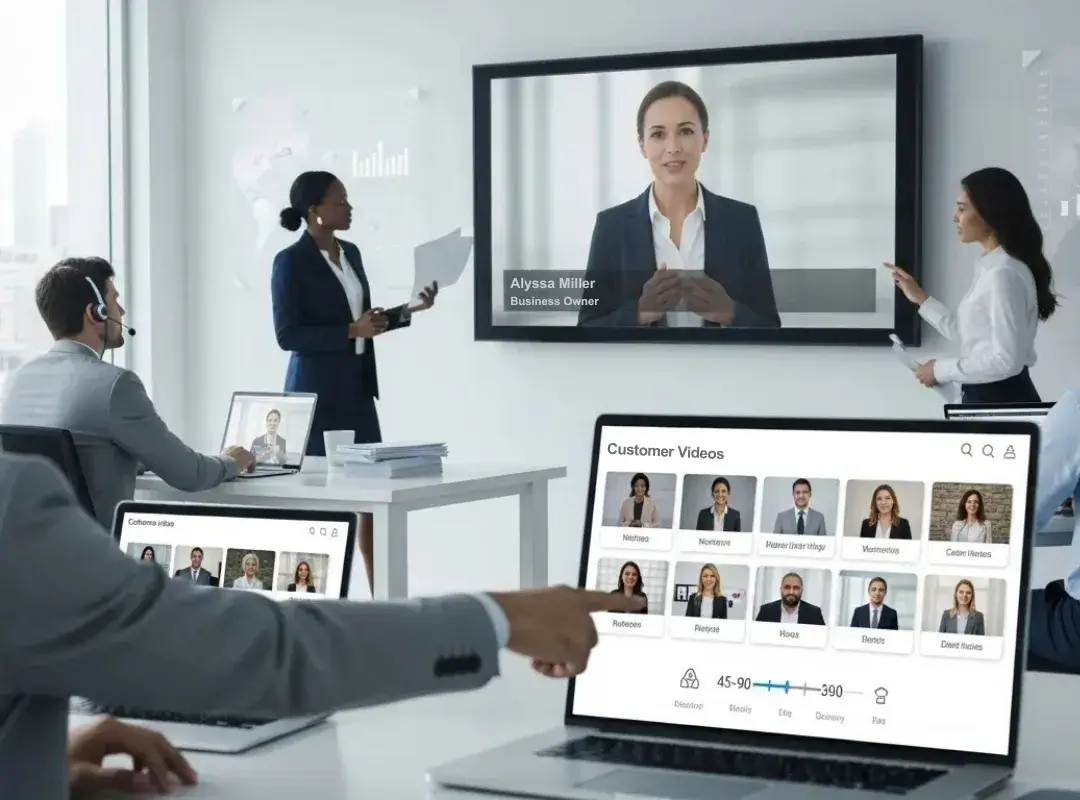
How to Build a Sales Proof Library
If your videos are scattered across random folders, they might as well not exist.
You want a proof library that’s easy for reps to search and simple to maintain.
Required tagging taxonomy
Every single video should carry a simple set of tags so reps can find “the one” in seconds.
At minimum, tag by:
- Industry – healthcare, financial services, real estate, etc.
- Company size – solo, small firm, mid‑market, enterprise.
- Role/persona – owner, CFO, practitioner, operations, marketing.
- Use case – lead gen, patient retention, compliance, upsell.
- Objection type – price, security, timing, complexity.
- Stage fit – discovery, proposal, objection, champion, renewal.
Pro tip: bake this into your naming convention so the file itself tells a story (e.g., Healthcare_SMB_CFO_ROI_Proposal_v1).
Where sales finds assets
Your reps shouldn’t have to dig.
Make sure the videos live in places they already use every day:
- Attached in your CRM as part of templates and snippets.
- Inside your sales enablement or “deal room” workspace, grouped by stage.
- Linked in standard email follow‑ups and proposal decks.
If reps can’t grab a video in under 10 seconds while writing an email, they won’t use it, no matter how good it is.
Governance rules
A little structure saves you from weird, outdated proof sneaking into big deals.
Put a few guardrails in place:
- Only approved videos make it into the library.
- Set review dates (for example, every 6–12 months) to refresh clips with old branding, features, or messaging.
- Keep records of usage rights, especially if clients signed specific terms.
That way your team stays fast and compliant instead of arguing with legal the night before a big pitch. (Know which formats to use for enterprise stakeholders with our Video Testimonials for Enterprise Sales guide.)
Sales Workflow Implementation (Simple 30-Day Rollout)
Let’s talk about getting this live instead of parking it on a to‑do list.
Here’s a simple 30‑day rollout you can follow without blowing up your calendar.
Week 1: Map your objections and gaps
Sit down with a few reps and ask:
- Where do deals stall? (Stage and reason.)
- What are the top 3 objections in each core segment?
- Which industries/roles you sell to the most?
From that, create a short “proof wishlist” like:
- 2 clips for healthcare security worries.
- 2 for finance ROI questions.
- 1–2 for real estate adoption/change management.
Week 2: Collect 5–10 focused clips
Don’t try to boil the ocean. Start tiny and targeted.
Reach out to specific happy clients and ask if they’d record a quick story. You can:
- Hop on a short Zoom call and hit record.
- Send them a guided recording link with 3–4 simple prompts.
Aim for unscripted answers, under two minutes, and then trim into micro‑clips.
Week 3: Tag and package
Drop every edited clip into your central folder or platform.
Tag everything using the taxonomy from earlier, then build a few “starter packs”:
- Healthcare discovery pack.
- Finance objection‑handling pack.
- Real estate proposal/implementation pack.
Share these as links inside your CRM, email templates, and Slack so everyone knows where to grab them.
Week 4: Deploy into real deals
Now you wire the proof into daily behavior:
- Add one recommended video to each standard email template (post‑discovery, post‑proposal, objection reply).
- Show reps, in a quick training, exactly when to send which clip.
- Ask them to log each send in the CRM (simple checkbox or note).
By the end of the month, you don’t just “have videos”, you’ve baked them into your sales rhythm.
Measuring Sales Impact
Views and likes are nice, but they don’t pay your team’s commissions.
You want to know: Do these videos help you close more, faster, at better prices?
Here’s how to track that without spinning up a PhD‑level analytics project.
1. Deal velocity
Compare opportunities where at least one video was sent vs. those without.
- How long did they stay in each stage?
- Did deals with proof move from discovery to proposal faster?
If you see even a small drop in days‑to‑close, that adds up across a pipeline.
2. Win rate by segment
Slice your data by industry or company size.
Do healthcare deals with implementation clips close more often than those without? Are finance prospects more likely to move forward when they see ROI stories?
This tells you where to double down.
3. Objection drop-off
Track how many deals die from specific objections before and after your team starts sending targeted clips.
If “security” used to kill 20% of pipeline, and now it’s 10%, that’s a huge signal the proof is doing its job.
4. Assisted conversion notes
Ask reps to drop a quick note when a prospect literally references a video:
“The clip from Dr. Patel’s practice really helped us feel comfortable.”
“Seeing another small firm do this made it a no‑brainer.”
Those little moments are gold. They show you the human side of the numbers. Learn more about measuring ROI from our Video Testimonial ROI guide.
Build Trust and Boost Sales with Share One
If you strip sales down to the essentials, you’re really doing two things: finding the right people and earning their trust fast.
Video testimonials do that second part for you on autopilot.
They give your reps a way to show proof instead of just talking about it, across discovery, proposals, objections, and renewals. They calm nerves, answer the “what if this goes wrong?” question, and let your prospects borrow confidence from people who already took the leap.
You don’t need a studio or a Hollywood budget. You need a handful of honest stories, a simple tagging system, and the discipline to drop those clips into the key moments of every deal.
Start small: identify three common objections, capture three short customer videos, and plug them into your follow‑ups this month.
Watch how many more prospects say, “This feels right,” instead of, “Let us think about it.”
Start Building Your Testimonials Library with Share One ➡️
Frequently Asked Questions
What are the main benefits of using video testimonials for sales teams?
Video testimonials for sales teams turn abstract claims into concrete proof. Short customer stories build trust, reduce perceived risk, and keep prospects on your site longer, which can help SEO. Used at key deal moments, they improve win rates, accelerate decisions, and reduce reliance on long PDFs or case studies.
How should sales teams use video testimonials at different stages of the sales process?
Map videos to specific deal moments. After discovery, send short validation clips. Post‑proposal, share implementation and ROI stories. Use objection‑specific clips when concerns arise, role‑based videos for champion enablement, and “what peers did next” stories during renewal or expansion conversations.
What types of sales testimonial videos work best in real deals?
Focus on simple, targeted formats: objection clips addressing one fear, outcome clips with clear numbers, implementation walk‑throughs, before/after narratives, and role‑based proof from similar titles. Keep them short (20–120 seconds), unscripted, and specific so they feel believable and easy to watch on mobile.
How can I organize video testimonials so sales reps actually use them?
Build a centralized proof library with consistent tagging. Tag each video by industry, company size, role, use case, objection type, and sales stage. Store them in tools reps already use (CRM, deal rooms, email templates) and ensure any clip is findable and insertable into an email in under 10 seconds.
How do I measure the impact of video testimonials for sales teams?
Track deal velocity and win rate for opportunities where videos were used versus not used. Monitor objection‑related drop‑off before and after deploying targeted clips. Ask reps to note when prospects reference specific videos. Together, these show whether testimonials are shortening cycles, improving conversion, or rescuing deals.
Do I need professional production to create effective sales testimonial videos?
Not necessarily. Many high‑performing testimonial videos are recorded over Zoom or simple recording links. Prioritize authenticity, clear audio, good lighting, and tight editing over polished production. Short, honest stories with specific outcomes usually outperform highly scripted, expensive shoots for building trust in B2B sales conversations.