HubSpot Landing Page & Email Video Testimonials (Workflows)
HubSpot Landing Page & Email Video Testimonials: exact landing page + email placements, workflows, and tracking to boost trust, lift conversions (50–70%), and
What happens to your conversion rate when prospects can see and hear real clients vouch for you? In many industries, adding strong social proof can lift conversions dramatically, and video testimonials often do the heavy lifting because they feel like a face-to-face referral (without the calendar invite). If you’re in healthcare, finance, or real estate, you’re fighting three battles at once: crowded competition, high trust requirements, and zero time to “create more content.” Good news, when you deploy video testimonials inside HubSpot the right way, you can build credibility, improve SEO signals like engagement, and move leads toward booked calls with fewer follow-ups… and I’ll show you the exact placements, workflows, and tracking to make it real.
Key Takeaways
- HubSpot landing page & email video testimonials can lift conversions by stacking trust and removing objections right before a prospect clicks your CTA.
- Place video testimonials where anxiety spikes: above/near the landing page CTA, mid-sequence in nurture emails, and as stage-specific proof inside deals to prevent stalls.
- Use three simple HubSpot workflows to make proof measurable: a landing page proof stack for booked-call lift, a nurture proof branch for CTR/replies, and deal-stage triggers to improve pipeline velocity.
- Match video length to placement—15–30s clips for CTAs and quick emails, and 60–90s stories for mid-funnel reassurance and complex sales conversations.
- Add captions and transcripts to every testimonial to improve mobile viewing, accessibility, reuse in pages/emails/ads, and on-page engagement signals that can support SEO.
- Track impact in HubSpot with a KPI map (landing conversion rate, email CTR/reply rate, and time-in-stage/win rate) and tag which proof asset was used so you can optimize what actually moves pipeline.
What This Page Covers (and What It Doesn’t)
Let’s clear the air up front, because search intent gets messy fast, especially with HubSpot.
Covers: placements, workflows, templates, tracking
This guide is for you if you’re already using HubSpot (Marketing Hub and/or Sales Hub) and you want video testimonials to do measurable work inside your funnel.
Here’s what we will cover:
- Placements that matter: landing pages, emails, deal stages, and smart content
- Copy/paste-friendly workflows: so you’re not reinventing the wheel at 10:47 p.m.
- Templates and “proof stacks” you can slot into pages/emails without redesigning everything
- Tracking + attribution inside HubSpot so you can answer the CEO question: “Did this move pipeline?”
If you want the bigger strategic picture beyond HubSpot screens, bookmark this deeper playbook on where testimonials tend to convert best and come back, today we’re staying implementation-focused.
Doesn’t cover: reviews of HubSpot
This is not a HubSpot review.
- No CRM comparisons
- No “best CRM in 2026” opinions
- No feature-by-feature breakdown of HubSpot tools
If you’re looking for general marketing guidance, HubSpot’s own articles are solid, especially the tactical posts on lead gen and email strategy. But here? We’re treating HubSpot as the engine you already chose, and we’re installing proof like a performance upgrade.
Why Video Testimonials Work in HubSpot’s Revenue Engine
HubSpot is great at capturing intent.
But intent is fragile. One unanswered doubt, “Will this work for someone like me?”, and your prospect vanishes like a text thread after you mention “quick call?”
That’s where video testimonials earn their keep.
Trust stacking + objection removal before a demo
Think of trust like a Jenga tower. You don’t win by placing one giant block at the end. You win by stacking small, confidence-building pieces before someone hits your CTA.
Video testimonials help you:
- Lower perceived risk (especially in high-stakes services like medical clinics, wealth management, or home buying)
- Answer objections silently (“Is this legit?” “Do they work with people like me?” “Will I regret this?”)
- Shorten the pre-demo back-and-forth because prospects self-qualify faster
And yes, there’s an SEO angle too. Pages with video often keep people around longer, and engagement can be a positive signal when your pages compete for the same keywords. Google’s own guidance on performance and page experience is worth skimming at Google Search Central, especially if you’re embedding media.
Definition Box: Assisted Conversion + Pipeline Velocity
Assisted conversion and pipeline velocity are the two HubSpot-friendly concepts that make testimonials easy to justify.
Assisted conversion (simple definition): A video testimonial helps a lead take the next step, even if it doesn’t get “last click” credit.
Example: your prospect watches a 22-second clip on a landing page, doesn’t book, then later replies to a nurture email and schedules. The testimonial assisted.
Pipeline velocity (simple definition): Video testimonials reduce time-in-stage by removing doubt at the exact moment it normally shows up.
In real life, velocity looks like:
- fewer “I need to think about it” stalls
- fewer internal approval delays (“Can you send proof?”)
- fewer ghosted follow-ups
If you want a simple mental model: HubSpot moves data. Testimonials move feelings. You need both.
HubSpot leverWhat it doesWhat video testimonials addBest place to deploy
Landing pagesCaptures demandInstant credibilityAbove/near CTA
Email automationNurtures intentTrust on autopilotObjection emails
Deals + tasksSales executionProof at the right momentStage triggers
ReportingMeasures realityAttribution clarityKPI map + tags
Where to Place Video Testimonials in HubSpot (Highest Leverage First)

If you only do one thing, do this: put proof where anxiety spikes.
Most businesses bury testimonials like a dusty trophy on a back shelf. The higher-leverage move is to place them where a buyer’s brain is whispering, “Don’t mess this up.”
Landing Pages (Pre-Demo / Pre-Call)
Your landing page is your digital front desk.
When a prospect hits “Book a call,” they’re not just choosing a time slot, they’re choosing a risk.
Placement hierarchy (fast and effective):
- One punchy clip above the fold, close to the primary CTA
- A small proof stack under the CTA (2–3 short quotes + headshots + one more clip)
- A longer story section mid-page for readers who scroll because they’re cautious (the cautious ones often become the best clients)
If you want a deeper walkthrough of why this works, keep this resource handy: how testimonials turn landing pages into conversion machines.
Quick real-world note: I’ve watched a financial advisor’s page go from “pretty” to persuasive after we swapped a generic hero image for a 17-second client clip that started with: “I was nervous about handing over my retirement…” You could feel the tension release.
Email Sequences (Nurture + Objection Handling)
Email is where doubts either die… or multiply.
The trick is to send video testimonials before the prospect asks you for proof. In HubSpot terms, that usually means:
- first nurture emails: education + clarity
- mid-sequence: proof that mirrors the reader’s situation
- late sequence: proof that handles the most stubborn objection (price, time, switching costs)
Want to align placements to each stage of intent? This guide on a testimonial-driven funnel from awareness to decision maps it cleanly.
Deal Stages (Proof at the Right Moment)
Deals stall in predictable places.
In healthcare, it’s often “Is this safe? Is this compliant? Will I be pressured?”
In real estate, it’s “Will this agent fight for me?”
In finance, it’s “Will I be judged? Will I lose money?”
So, attach proof to the stage:
- After discovery: send a clip that reinforces “we listen first”
- After proposal: send a clip that validates ROI and outcomes
- When a deal is idle: auto-send “here’s what a client did next” (gentle nudge, not a guilt trip)
And if you need fresh ideas for sales enablement language, you can borrow frameworks from reputable SEO and marketing breakdowns, not for HubSpot setup, but for messaging angles that match how people decide.
Smart Content Personalization (Segment-Based Proof)
This is where HubSpot gets unfair (in a good way).
If you serve multiple verticals, say, med spas + dentists + chiropractors, don’t show everyone the same “generic happy client.” That’s how you get polite interest… and quiet drop-offs.
Instead, personalize by:
- Industry (healthcare vs finance vs real estate)
- Lifecycle stage (subscriber vs MQL vs SQL)
- Service line (tax planning vs retirement vs estate)
HubSpot Smart Content lets you swap testimonial modules based on contact properties. When your prospect sees “Someone like me got results,” their brain stops negotiating and starts imagining.
3 HubSpot Proof Workflows (Step-by-Step)
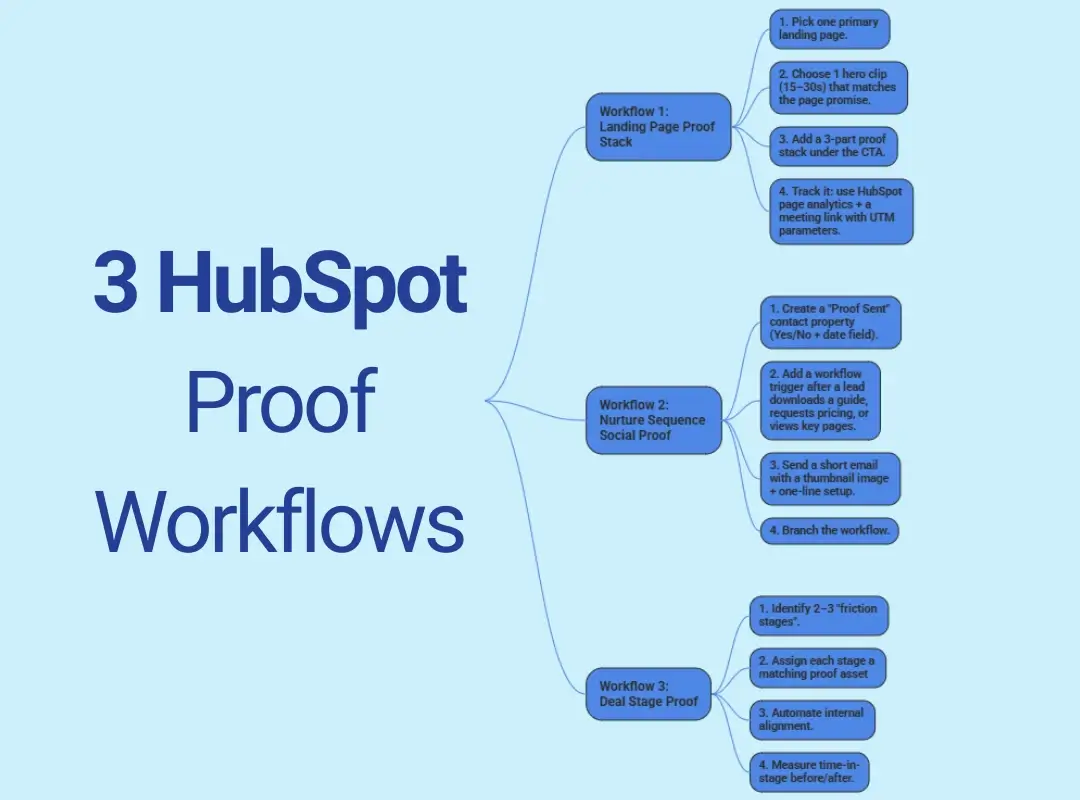
You don’t need a complicated machine. You need a simple system you’ll keep.
Below are three workflows we use as the backbone when we deploy video testimonials into HubSpot for pipeline impact.
Workflow 1: Landing Page Proof Stack → Booked Call Lift
Goal: Increase “book a call” conversions without redesigning your whole page.
Step-by-step:1. Pick one primary landing page (the one tied to revenue, demo, consult, new patient call, listing consult).
2. Choose 1 hero clip (15–30s) that matches the page promise.
3. Add a 3-part proof stack under the CTA:
- 1 short quote (1 sentence)
- 1 micro-clip (10–20s)
- 1 outcome bullet (e.g., “Saved $4,200/month,” “Closed in 28 days,” “A1C dropped in 12 weeks”, only if compliant/appropriate)
4. Track it: use HubSpot page analytics + a meeting link with UTM parameters.
Pro tip (learned the hard way): don’t start with your longest testimonial. People are scrolling on phones in line at Starbucks. Earn attention first, then offer depth.
Workflow 2: Nurture Sequence Social Proof → CTR/Reply Lift
Goal: Get more clicks and replies from leads who are interested but hesitant.
Step-by-step:1. Create a “Proof Sent” contact property (Yes/No + date field).
2. Add a workflow trigger after a lead downloads a guide, requests pricing, or views key pages.
3. Send a short email with a thumbnail image + one-line setup:
- “If you’re wondering if this works for someone in your situation, watch this 24-second clip.”
4. Branch the workflow:
- If they click: send a follow-up that asks one easy question (“Want me to map this to your situation?”)
- If they don’t click: send a different clip that handles a different objection (price/time/switching)
If you want to squeeze more value from every recording, build a reuse habit. Here’s a practical guide on repurposing testimonials into emails, ads, and sales assets without turning your marketing calendar into a stress spiral.
Workflow 3: Deal Stage Proof → Pipeline Velocity
Goal: Reduce time stuck in stage and improve close rates.
Step-by-step:1. Identify 2–3 “friction stages” (common ones: “Proposal Sent,” “Decision,” “Waiting on client”).
2. Assign each stage a matching proof asset:
- Proposal Sent → ROI/outcome testimonial
- Decision → emotional reassurance testimonial
- Waiting on client → “here’s what happened after I said yes” testimonial
3.Automate internal alignment:
- When the deal enters stage → task for rep + email template suggestion + proof link
4. Measure time-in-stage before/after (more on that below).
Small story: one real estate team we worked with had deals getting stuck right after inspection negotiations. We inserted a quick client clip about how the agent handled a stressful inspection week (you could hear the relief in their voice). It didn’t “force” a close, but it made follow-ups feel less like pestering and more like guiding.
Testimonial Video Specs for HubSpot (So They Convert)
Your video can be authentic and effective. But it needs to be HubSpot-friendly, fast to load, easy to reuse, and structured around the buyer’s real questions.
15–30s Clips vs 60–90s Stories (When to Use Each)
Use 15–30 second clips when speed matters:
- landing pages near CTAs
- short nurture emails
- deal stage nudges
These should start with the punchline in the first 2–3 seconds. Not your logo. Not the client’s job title. The moment of tension.
Use 60–90 second stories when depth matters:
- mid-funnel nurture
- sales enablement for complex services
- stakeholders who need reassurance (spouses, partners, compliance teams)
A simple story arc that converts:
- Before: what felt risky or frustrating
- During: what changed (process + experience)
- After: outcome + why they’d recommend you
Captions + Transcripts (Accessibility + LLM Extraction)
Transcripts and captions aren’t a “nice-to-have.” They’re a multiplier.
- People watch muted (especially on mobile)
- Captions increase comprehension and retention
- Transcripts give you instant copy for landing pages, emails, and ads
Also, this is the newer wrinkle: transcripts make your proof easier to reuse in AI workflows (summaries, snippets, variations) without misquoting the client. You’re turning one story into a content library.
Embed vs Thumbnail Link (Tradeoffs)
This is the classic HubSpot question: do you embed the video on the page, or link out?
Embed when:
- you’re on a high-intent landing page
- you want the viewer to stay in the conversion environment
- your page speed is still strong
Use a thumbnail link when:
- mobile speed is a concern
- you’re sending email (embedded video players in emails are inconsistent)
- you want a “click-to-watch” micro-commitment
If you’re worried about performance, don’t guess, build it right. This guide on embedding testimonial videos without slowing your site lays out practical options so you keep Core Web Vitals happy and keep the proof visible.
How to Measure Impact (KPI Map)
If you don’t measure it, your testimonials become “nice brand stuff” instead of a growth asset.
Here’s a clean KPI map you can use inside HubSpot.
Landing Conversion Rate
Primary metric: landing page conversion rate (CTA click, form submit, meetings booked)
How to track it well:
- compare page performance before vs after adding the proof stack
- keep everything else stable for at least 2 weeks (same offer, same traffic sources)
- add UTMs to meeting links so you can see source/medium
Reality check: you’re looking for directional lift first. Don’t wait for perfect data, marketing isn’t a lab, it’s a kitchen during dinner rush.
Email CTR + Reply Rate
Primary metrics: click-through rate and reply rate.
Video testimonials in email tend to lift performance when:
- the subject line hints at a specific outcome (“How Mark cut admin time in half”)
- the email is short and human (no paragraphs that look like a legal document)
- the CTA is low-friction (“Want the same setup?”)
Track results by comparing:
- emails with proof vs without proof
- proof type (clip vs story)
- objection matched (price vs time vs trust)
Opportunity Stage Movement + Win Rate
Primary metrics: time in stage, stage-to-stage conversion, win rate.
This is where your sales team starts to care.
- If time in stage drops, your proof is removing friction.
- If stage conversion improves, your proof is handling objections.
- If win rate improves, your proof is reinforcing belief right before the decision.
Set up a simple internal dashboard:
- Avg days in stage (last 30/60/90)
- Deal count by stage
- Win rate by source
- Notes/tagging field: “Proof asset used” (so reps can mark what they sent)
Common Mistakes That Kill Results
Most testimonial strategies fail for boring reasons, not because “video doesn’t work.” Here’s what to avoid.
1. Random placement (“we added it to the site.”)
You need proof near the decision point, not tucked into a testimonials page no one visits.
2. Videos that are too long for the placement
A 4-minute story on a pre-demo landing page is like telling your life story to the barista while the line grows behind you.
3. No message match
If your landing page promises “Book a 15-minute consult,” but the testimonial talks about your “amazing culture,” you’re leaving money on the table.
4. No tracking, no tags, no learning loop
If you can’t answer “Which clip moved deals forward?” you’ll never get consistent buy-in, or consistent improvement.
5. Over-scripted testimonials
The polished, rehearsed stuff makes people suspicious. Slight imperfections, an honest laugh, a pause, a “I was skeptical at first…”, are the trust signals.
6. Ignoring speed and mobile experience
Your prospect is often watching on a phone. If the page feels heavy, they bounce.
If you want a simple way to deploy proof without wrecking performance, a dedicated widget can help, here’s a solid explainer on using a video testimonial widget that stays fast.
Start With HubSpot-Ready Proof Assets with Share One
If you’re thinking, “This all sounds smart… but I don’t have time to chase clients, direct interviews, edit footage, and then slice it into 15-second clips,” you’re not alone.
That’s the exact gap we built Share One to close.
Share One is a done-for-you video testimonial service that captures authentic customer stories with trained human interview directors, real conversations that pull out the good stuff (the doubts, the turning point, the outcome), without you awkwardly begging for praise or playing amateur film crew.
Here’s what “HubSpot-ready” looks like in practice:
- Short clips (15–30s) for landing pages and emails
- Deeper stories (60–90s) for nurture and sales enablement
- Captions + transcripts so your proof is accessible, searchable, and easy to repurpose
- Clean delivery so your team can drop assets straight into HubSpot pages, sequences, and deal-stage emails
A quick example from the field: one of our service clients (a founder-led professional firm) had plenty of happy customers, but the praise lived in scattered emails and DMs. We recorded a handful of director-led interviews, carved them into stage-specific clips, and placed them into their consult booking page plus a short objection-handling sequence. The immediate win wasn’t “viral” views, it was fewer skeptical replies and more calls that started with, “I watched that client story and… yep, that’s me.” That’s the sound of friction disappearing.
If you want the highest leverage next step, start by collecting proof that fits your funnel, then deploy it where HubSpot can use it.
Start building trust today with Share One
Frequently Asked Questions
Can you add video testimonials directly inside HubSpot?
Yes. You can add video testimonials directly inside HubSpot using landing page modules, rich text embeds, or thumbnail links in emails. Videos can live on landing pages, be triggered through workflows, or sent in sequences. The key is placing them before key conversion actions so proof supports decisions, not follows them.
Where should video testimonials go in HubSpot landing pages and emails?
On landing pages, place video testimonials immediately before or near the primary CTA, not buried at the bottom. In emails, use them after value framing or objection handling, usually as a thumbnail linked to a hosted video. Priority order is landing pages first, then nurture emails, then deal-stage follow-ups.
What testimonial video length works best for HubSpot lead nurture?
For HubSpot lead nurture, 15 to 30 second clips perform best. Short clips answer one objection or result and fit naturally into emails and workflows. Longer 60 to 90 second stories work better on landing pages or sales follow-ups, where intent is higher and attention is earned.
How do you track the impact of testimonials in HubSpot?
Track impact using landing page conversion rates, email CTR and replies, and assisted conversion reports inside HubSpot. Use UTMs or custom events on testimonial clicks, then review influenced deals and stage progression. Testimonials rarely get last-click credit, so assisted conversion and velocity metrics matter most.
How many testimonials should you use on a HubSpot landing page?
Use three to five testimonials on a HubSpot landing page, structured as a proof stack. Start with one primary video near the CTA, then reinforce with two to four supporting clips or quotes. More than five usually creates noise. Fewer than three often lacks enough trust coverage for different objections.